
Shared Tasks Graph is one of Understand's built-in reports — run it on your own code from the GUI, or headlessly with und report.
Shared Tasks Graph
Languages: AnyTargets: Architectures
List the nodes and edges that appear in the Shared Tasks Graph
Architectures are used to tag the root functions defining the call trees. This report runs on such architectures to list the nodes and edges that appear in the Shared Tasks Graph
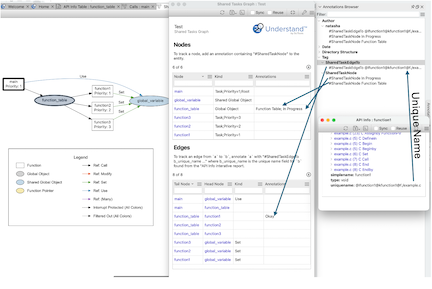
To aid users who must track information about the graph, the report defines an annotation scheme. Annotations are used because they are persistent, shared, and easily accessible from the API. It's also possible to create them from the API for more automated processes, and they remember the author and date.
To annotate a node, annotate the corresponding entity and begin the annotation with "#SharedTaskNode". The rest of the annotation, after the tag, will be shown in the table. Multiple annotations are seperated with ';', just like multiple kinds. Note that newlines don't display well inside Interactive Report tables, so it's recommended to avoid those.
Similarly, to annotate the edge `a` to `b`, annotate the entity `a` with an annotation the begins with "#SharedTaskEdgeTo b_unique_name" where b_unique_name can be found by running the interactive report "API Info" on `b` and looking for the unique name field near the bottom. The remainder of the annotation will appear in the table
Example:
Architecture Structure
Working with multiple call trees means working with multiple root functions. To pass multiple entities to a plugin, the entities must be grouped together in an architecture. A simple architecture can have the format:
- Name of root architecture can be anything
- Any name containing the word tasks (case insensitive)
- function1()
- function2()
- Any name containing the word tasks (case insensitive)
The shared tasks plugins also support additional fields for the tasks. These fields are displayed on the graph under the task name, and in the table as columns. Currently supported fields are 'core' and 'priority'. A field can be used instead of an architecture name containing the word tasks.
- Name of root architecture can be anything
- Any name containing the the word core or priority (case insensitive)
- Field value like 1
- function1()
- Another field value like 2
- function2()
- Field value like 1
- Any name containing the the word core or priority (case insensitive)
Finally, the architecture can be used to identify functions that enable and disable interrupts. References protected by these functions (preceded by a call to the disable function and followed by a call to the enable function) are identified by the plugins. The naming pattern interrupt control is (ommitting the tasks):
- Name of root architecture can be anything
- name containing the word interrupt or the word control (case insensitive)
- any name here. This layer allows multiple pairs of interrupt functions
- enable
- enableFunction()
- disable
- disableFunction()
- enable
- any name here. This layer allows multiple pairs of interrupt functions
- name containing the word interrupt or the word control (case insensitive)