
Blank Lines is one of the source-code metrics Understand computes across 17+ languages — browse them in the GUI, export and track them, or script them with the Python API.
Blank Lines
API ID: CountLineBlankAlso Known As: Blank Lines of Code (BLOC)
Languages: Ada, Assembly, Basic, C#, C++, Fortran, Java, Jovial, Pascal, Python, Rust, VHDL, Web
Targets: Architectures, Classes, Files, Functions, Modules, Packages, Project, Subprograms
Number of blank lines.
A line only counts if it is active.
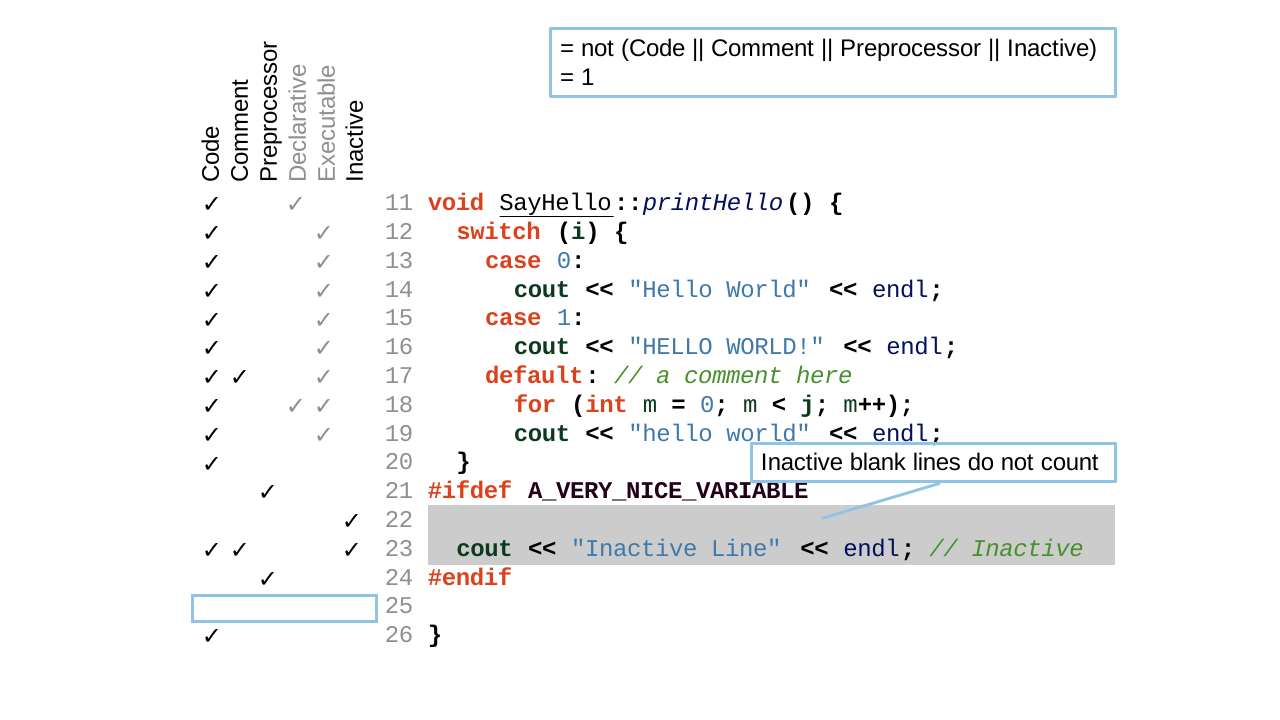
For example:
void SayHello::printHello() {
  switch (i) {
    case 0:
      cout << "Hello World" << endl;
    case 1:
      cout << "HELLO WORLD!" << endl;
    default: // a comment here
      for (int m = 0; m < j; m++);
      cout << "hello world" << endl;
  }
#ifdef A_VERY_NICE_VARIABLE

  cout << "Inactive Line" << endl; // Inactive
#endif

}
Line 25, the blank line just before the closing brace, is the only blank active line. The blank line inside the #ifdef A_VERY_NICE_VARIABLE block (line 22) doesn't count because it's inactive, giving CountLineBlank = 1.
To also count blank lines inside inactive regions, use Blank Lines (Includes Inactive). For the per-language breakdown in web files, see Blank Lines (HTML), Blank Lines (JavaScript), and Blank Lines (PHP).
Also known as Blank Lines of Code (BLOC).
 Targets By Language:
- Ada: Project, File, Type, Entry, Function, Package, Procedure, Protected, Task
- Basic: Project, File, Method, Module, Class
- C#: Project, File, Class, Method
- C++: Project, File, Class, Struct, Union, Function
- Fortran: Project, File, Module, Block Data, Function, Program, Subroutine
- Java: Project, File, Class, Interface, Method
- Jovial: Project, File, Module, Subroutine
- Pascal: Project, File, Class, Interface, Compunit, Function, Procedure
- Python: Project, File, Class, Function
- Rust: Project, File, Function
- VHDL: Project, File, Procedure, Function, Process, Architecture
- Web: Project, File, PHP Class, PHP Interface
- This metric can be disabled from "Project Configuration/Metrics/Lines and Statements" with the "Show line count metrics" option.
- This metric can be disabled from "Project Configuration/Metrics/Lines and Statements" with the "Include inactive lines" option for languages that have inactive lines.
- For projects and architectures, this metric is enabled from "Project Configuration/Metrics/Projects and Architectures" with the "Show default summary metrics" option.