
Max Nesting is one of the source-code metrics Understand computes across 17+ languages — browse them in the GUI, export and track them, or script them with the Python API.
Max Nesting
API ID: MaxNestingLanguages: Ada, Basic, C#, C++, Fortran, Java, Jovial, Pascal, Python, Rust, Web
Targets: Architectures, Classes, Files, Functions, Modules, Packages, Project, Subprograms
Maximum nesting level of control constructs (if, while, for, switch, etc.) in the function.
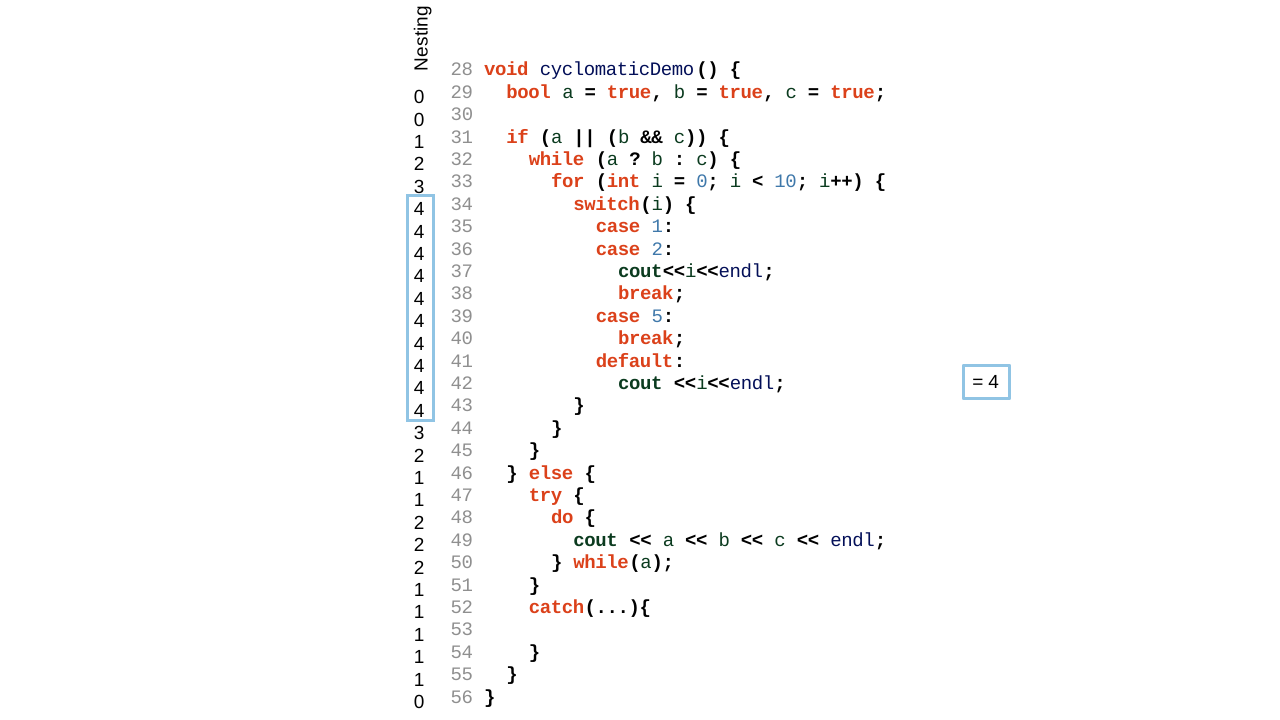
For example:
void cyclomaticDemo() {
  bool a = true, b = true, c = true;

  if (a || (b && c)) {
    while (a ? b : c) {
      for (int i = 0; i < 10; i++) {
        switch (i) {
          case 1:
          case 2:
            cout << i << endl;
            break;
          case 5:
            break;
          default:
            cout << i << endl;
        }
      }
    }
  } else {
    try {
      do {
        cout << a << b << c << endl;
      } while (a);
    }
    catch (...) {
    }
  }
}
Nesting starts at 0 for the function's top-level statements and increases by 1 for each control construct nested inside another. The if is nesting level 1; the while inside it is level 2; the for inside that is level 3; and the switch inside that is level 4 — the deepest point in the function. The else branch's try/do only reaches nesting level 2. The maximum across the whole function is 4.
See Cyclomatic Complexity, which uses the same example.
 Targets By Language:
- Ada: Project, File, Type, Entry, Function, Package, Procedure, Protected, Task
- Basic: Project, File, Method, Module, Class, Struct
- C#: Project, File, Class, Struct, Method
- C++: Project, File, Class, Struct, Union, Function
- Fortran: Project, File, Module, Block Data, Function, Program, Subroutine
- Java: Project, File, Class, Interface, Method
- Jovial: Project, File, Subroutine
- Pascal: Project, File, Class, Interface, Compunit, Function, Procedure
- Python: Project, File, Class, Function
- Rust: Project, File, Function
- Web: Project, File, PHP Class, PHP Interface
- For projects and architectures, this metric must also be enabled from "Project Configuration/Metrics/Projects and Architectures" with the "Show aggregated function metrics" option.
- This metric can be disabled from "Project Configuration/Metrics/Complexity" with the "Maximum Nesting" option.