
Shared Tasks Graphs AI is one of Understand's built-in reports — run it on your own code from the GUI, or headlessly with und report.
Shared Tasks Graphs AI
Languages: AnyTargets: Architectures
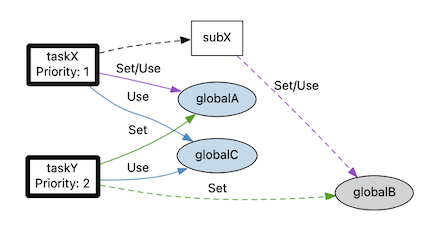
The shared tasks plugins find global objects accessed from multiple call trees.
Architectures are used to tag the root functions definng the call trees. This interactive report displays nodes and edges from the shared tasks graph in separate tables. Nodes show entity names, kinds (including task fields, function pointer status, and shared global object status), and annotations. Edges show source and destination nodes, edge kinds (including interrupt protected and filtered status), and annotations. You can add custom annotations to entities that will appear in the tables.
Example:
Architecture Structure
Working with multiple call trees means working with multiple root functions. To pass multiple entities to a plugin, the entities must be grouped together in an architecture. A simple architecture can have the format:
- Name of root architecture can be anything
- Any name containing the word tasks (case insensitive)
- function1()
- function2()
- Any name containing the word tasks (case insensitive)
The shared tasks plugins also support additional fields for the tasks. These fields are displayed on the graph under the task name, and in the table as columns. Currently supported fields are 'core' and 'priority'. A field can be used instead of an architecture name containing the word tasks.
- Name of root architecture can be anything
- Any name containing the the word core or priority (case insensitive)
- Field value like 1
- function1()
- Another field value like 2
- function2()
- Field value like 1
- Any name containing the the word core or priority (case insensitive)
Finally, the architecture can be used to identify functions that enable and disable interrupts. References protected by these functions (preceded by a call to the disable function and followed by a call to the enable function) are identified by the plugins. The naming pattern interrupt control is (ommitting the tasks):
- Name of root architecture can be anything
- name containing the word interrupt or the word control (case insensitive)
- any name here. This layer allows multiple pairs of interrupt functions
- enable
- enableFunction()
- disable
- disableFunction()
- enable
- any name here. This layer allows multiple pairs of interrupt functions
- name containing the word interrupt or the word control (case insensitive)
More documentation is available in the README ↗ file in the repository. See also the Shared Tasks solution, the interactive report and the related graph plugin for objects. Also related are concurrency plugins.