
Solution: Shared Tasks
Calls graphs with global objects are useful for finding all global objects accessed by a call tree. But, what if you want to find which global objects are shared between multiple call trees?
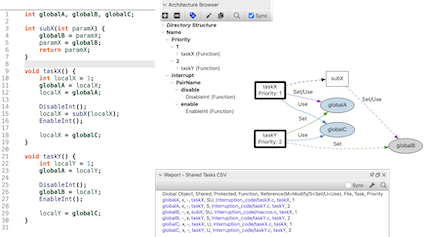
Architectures are used to tag the root functions defining the call trees. Then shared global objects can be found by graphing or exporting the architecture. It's also possible to start from an object and find the root functions with the Shared Tasks - By Object graph. The Shared Tasks - Lock Order graph finds possible deadlocks, where tasks take the same locks in different orders.
Architecture Structure
Working with multiple call trees means working with multiple root functions. To pass multiple entities to a plugin, the entities must be grouped together in an architecture. A simple architecture can have the format:
- Name of root architecture can be anything
- Any name containing the word
tasks(case insensitive)- function1()
- function2()
The shared tasks plugins also support additional fields for the tasks. These fields are displayed on the graph under the task name, and in the table as columns. Currently supported fields are 'core' and 'priority'. A field can be used instead of an architecture name containing the word tasks.
- Name of root architecture can be anything
- Any name containing the the word
coreorpriority(case insensitive)- Field value like 1
- function1()
- Another field value like 2
- function2()
Finally, the architecture can be used to identify functions that enable and disable interrupts. References protected by these functions (preceeded by a call to the disable function and followed by a call to the enable function) are identified by the plugins. The naming pattern interrupt control is (ommitting the tasks):
- Name of root architecture can be anything
- name containing the word
interruptor the wordcontrol(case insensitive)- any name here. This layer allows multiple pairs of interrupt functions
- enable
- enableFunction()
- disable
- disableFunction()
The same pairs work for mutexes and semaphores, named lock and unlock (or acquire and release) instead of disable and enable.
More documentation and scripts are available in the README ↗ file in the repository and in the two blog articles Finding Shared Global Objects ↗ and Visualizing Shared Tasks ↗. Also check out concurrency plugins.
Shared Tasks Plugins
| Name | Kind |
|---|---|
| Shared Tasks | Graph |
| Shared Tasks | Graph |
| Shared Tasks | Graph |
| Shared Tasks CSV | Interactive Report |
| Shared Tasks Graph | Interactive Report |
| Shared Tasks Graphs AI | Interactive Report |