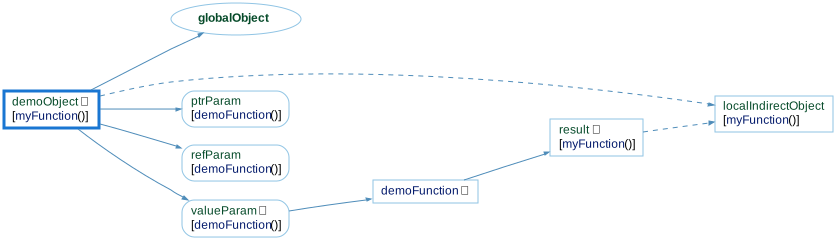
Assigned To is one of the interactive graphs Understand can draw of your code — call trees, dependencies, control flow, and more.
Assigned To
Languages: Ada, C#, C++, JavaTargets: Functions, Objects
Variants: Classic, Cluster, Compare, Relationship, Simplified
Show the objects, functions, and parameters that a selected entity's value is directly or indirectly assigned into.
For a selected object, variable, or parameter, this shows edges to the entities on the left-hand side of assignments where the selected entity appears on the right, then recurses forward into whatever those entities are themselves assigned into, building a multi-level tree. Passing the entity as a function argument counts as an assignment to the corresponding parameter, so edges continue through the parameter into whatever the function does with it; if the function's return value depends on the entity, the graph continues from the function into wherever that return value is used.
Edges are solid when the entity is assigned directly (e.g. globalObject = demoObject;) and dashed when it's only part of a larger expression (e.g. localIndirectObject = demoObject + result;). Compound assignment operators like += and ++ are tracked the same way — always indirectly, since they combine the existing value with another operand. The inverse graph, Assignments, shows the reverse relationship — the assignments a selected entity's value is built from.
For example, see the following code and corresponding graph
extern int globalObject;

int demoFunction(int valueParam, int &refParam, int *ptrParam)
{
  return valueParam;
}

void myFunction()
{
  int demoObject = 0;

  globalObject = demoObject; // demoObject -> globalObject

  // demoObject -> valueParam; demoObject -> refParam
  // demoObject -> ptrParam; demoFunction -> result
  int result = demoFunction(demoObject, demoObject, &demoObject);

  // The following is indirect because it's an expression.
  // demoObject -> localIndirectObject
  int localIndirectObject = demoObject + result;
}
Assigned To - Classic
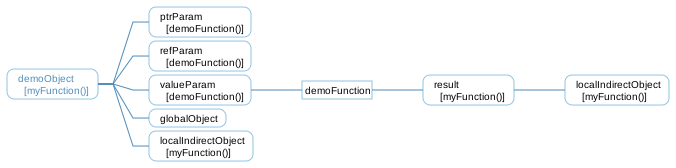
The Classic variant is similar to the Simplified variant, showing all relationships in a simple tree, but it uses a custom layout algorithm instead of Graphviz.
Assigned To - Cluster
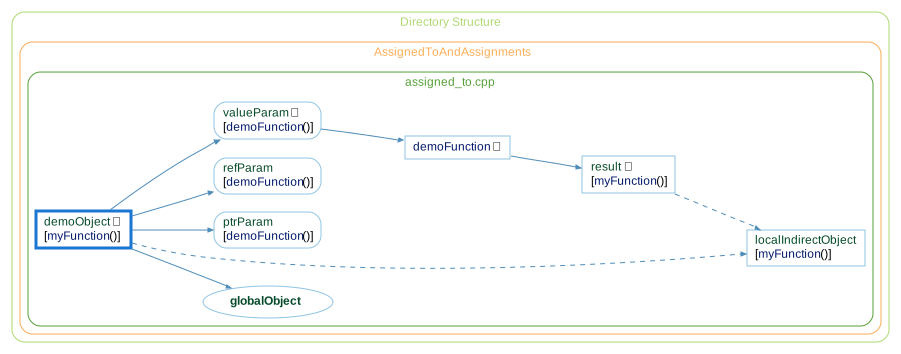
The Cluster variant groups entities by their containing class/file/architecture.
Assigned To - Compare
The Compare variant shows how the graph has changed relative to the project's comparison database.
Assigned To - Relationship
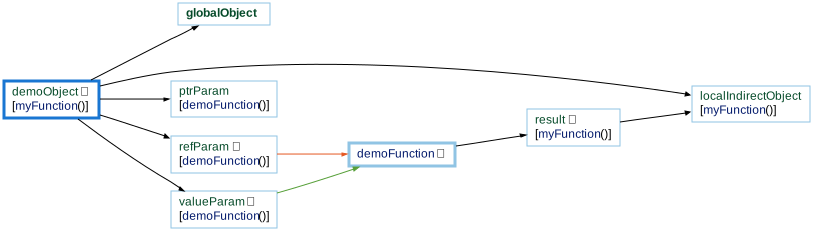
The Relationship variant filters the graph to only paths connecting the two entities.

Assigned To - Simplified
The Simplified variant shows all relationships in a simple tree (no clusters)