
Calls & Called By - Internal with Objects is one of the interactive graphs Understand can draw of your code — call trees, dependencies, control flow, and more.
Calls & Called By - Internal with Objects
Languages: AnyTargets: Classes, Files
Show the connectivity of functions and objects in a class or file
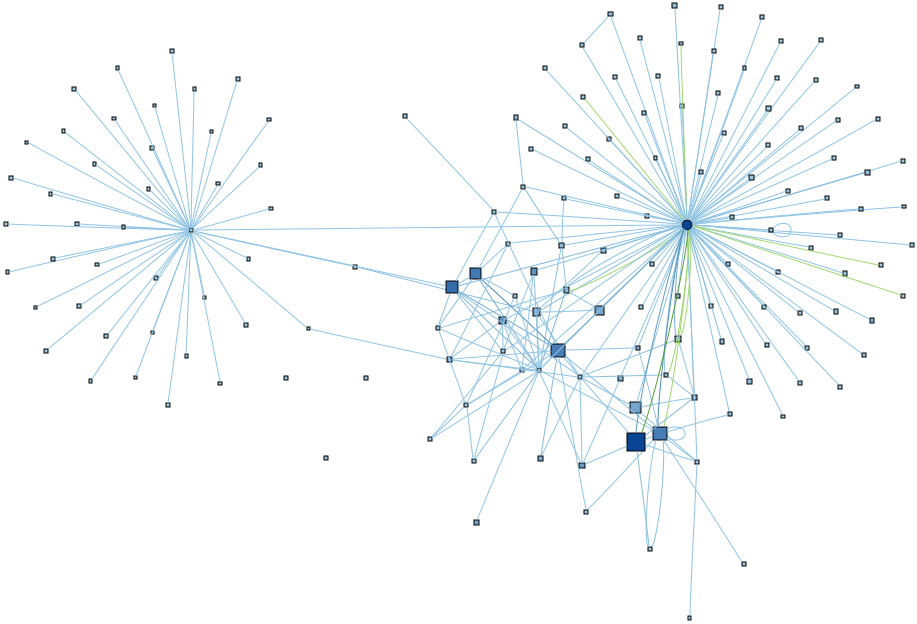
Get an overview of the contents and cohesion of a class or file. The layout algorithm tends to form natural clusters from highly connected nodes, revealing structure around the components.
Size and color scales draw attention to the most relevant features. Functions are squares, with size by lines of code and color by cyclomatic complexity. So large functions and darker blue functions are likely to be key components.
Objects are circles sized by total number of uses, sets, and modifications, making relevant objects more obvious. Objects are colored by the ratio of sets/modifications to uses, drawing attention to objects that change frequently
Edges are colored by the type of reference, following the Object References graph with calls and uses shown in blue, sets in green, and modifications in red. Edges are scaled by the number of references. So, for example, if function1() calls function2() multiple times, the edge will be a darker blue.
For example, check out the graph from the CMake sample project of the class cmTarget. The natural clusters highlight a key function on the left, and a key object on the right, with only a few functions connecting the two parts of the class.
This variant is a plugin. It can be enabled/disabled from the Plugin Manager.