
Data Flow Out is one of the interactive graphs Understand can draw of your code — call trees, dependencies, control flow, and more.
Data Flow Out
Languages: Ada, Basic, C#, C++, Fortran, Java, Jovial, Pascal, Python, Rust, VHDL, WebTargets: Objects
Variants: Cluster, Compare, Relationship, Simplified
Show what uses a selected object's value, directly or indirectly.
For a selected object, variable, field, or property, this shows an edge to each function that uses it, then recurses into whatever objects that function sets or modifies, continuing to whoever uses those objects in turn, building a multi-level tree forward through the computation. Each function in the tree also shows its own callees.
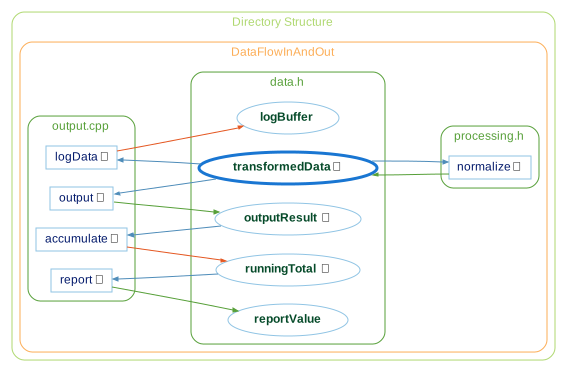
Rooted at transformedData below, the graph shows it's used by normalize (which also sets it, reading its own current value first), output, and logData. output sets outputResult, which is used by accumulate, which modifies runningTotal, which is used by report which sets reportValue. logData modifies logBuffer rather than replacing it outright. The inverse graph, Data Flow In, shows the reverse relationship — everything that sets or modifies a selected object's value.
See the following code and corresponding graph
extern int auxData;
extern int transformedData;
extern int outputResult;
extern int logBuffer;
extern int runningTotal;
extern int reportValue;

void normalize()
{
    if (transformedData > 100)
        transformedData = 100;
    else
        transformedData = transformedData + auxData;
}

void output()
{
    outputResult = transformedData;
}

void logData()
{
    logBuffer += transformedData;
}

void accumulate()
{
    runningTotal += outputResult;
}

void report()
{
    reportValue = runningTotal;
}
Data Flow Out - Cluster
The Cluster variant groups entities by their containing class/file/architecture.
Data Flow Out - Compare
The Compare variant shows how the graph has changed relative to the project's comparison database.

Data Flow Out - Relationship
The Relationship variant filters the graph to only paths connecting the two entities.

Data Flow Out - Simplified
The Simplified variant shows all relationships in a simple tree (no clusters)
