Data Members is one of the interactive graphs Understand can draw of your code — call trees, dependencies, control flow, and more.
Data Members
Languages: C#, C++, FortranTargets: Classes, Objects, Types
Variants: Classic, Cluster, Compare, Relationship, Simplified
Show the data members nested inside a selected type, down to their primitive fields.
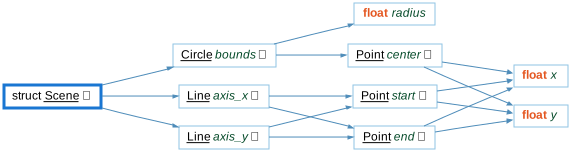
For a selected class, struct, union, or variable, this shows an edge to each of its data members, then continues into any member whose type is itself a class, struct, or union, recursing into that type's own members in turn. Base class members aren't included, since inheritance isn't followed; a plain type alias (typedef) is skipped in favor of the underlying type it names.
Rooted at Scene below, the graph shows its members axis_x and axis_y (each a Line) and bounds (a Circle). Line continues into its own members start and end (each a Point), and Circle continues into center (a Point) and radius (a plain float). Each Point continues into its primitive members x and y.
See the following code and corresponding graph
struct Point {
    float x;
    float y;
};

struct Line {
    Point start;
    Point end;
};

struct Circle {
    Point center;
    float radius;
};

struct Scene {
    Line   axis_x;
    Line   axis_y;
    Circle bounds;
};
Data Members - Classic
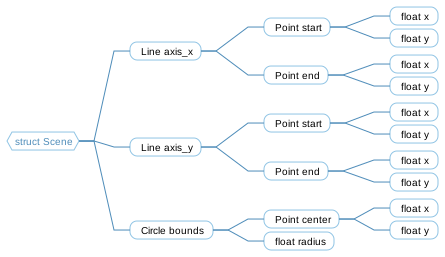
The Classic variant is similar to the Simplified variant, showing all relationships in a simple tree, but it uses a custom layout algorithm instead of Graphviz.
Data Members - Cluster
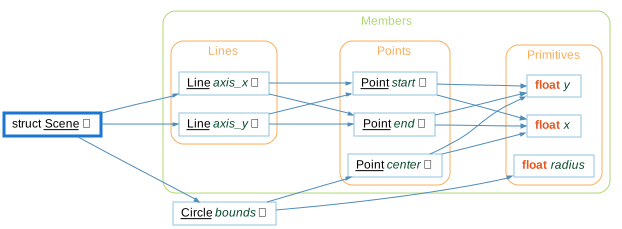
The Cluster variant groups entities by their containing class/file/architecture.
Data Members - Compare
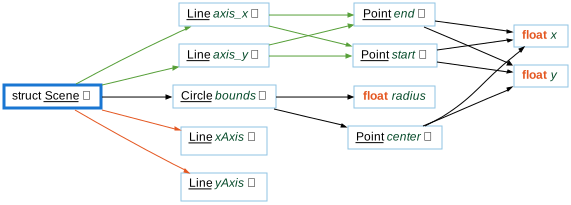
The Compare variant shows how the graph has changed relative to the project's comparison database.
Data Members - Relationship
The Relationship variant filters the graph to only paths connecting the two entities.
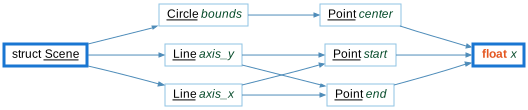
Data Members - Simplified
The Simplified variant shows all relationships in a simple tree (no clusters)