Declaration is one of the interactive graphs Understand can draw of your code — call trees, dependencies, control flow, and more.
Declaration
Languages: Ada, Assembly, C#, C++, Fortran, Java, Jovial, Pascal, Python, WebTargets: Classes, Files, Functions, Modules, Objects, Packages, Record Types, Subprograms, Types
Variants: Ada, Assembly File, C Class, C Code File, C Header File, C Namespace, C# File, C# Type, Enum, Fortran Common, Fortran Derived Type, Fortran File, Fortran Module, Fortran Subroutine, Function, Java Class, Java File, Jovial File, Pascal Class, Pascal CompUnit Unit, Pascal File Include, Pascal Sql Table, Python Class, Python File, Web Class, Web File
Declaration - Ada
Show a diagram of a selected Ada unit’s own declarations, plus (depending on the unit’s kind and which options are enabled) the units it withs, is withed by, calls, and is called by.
The main box lists what’s declared directly inside the selected unit: subprograms, nested packages, task types, and protected types on the left; types, constants, exceptions, and objects on the right. What actually shows up depends on the selected unit’s own kind — a package can contain any of these, while a task type or protected type can only contain entries, subprograms, and components.
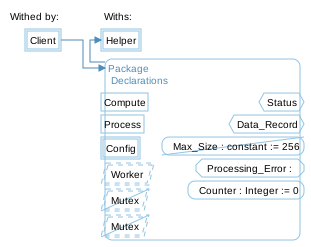
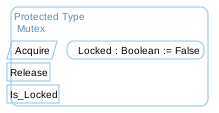
Rooted at the package Declarations below, the left side of the box shows the function Compute, the procedure Process, the nested package Config, the task type Worker, and the protected type Mutex; the right side shows the enumeration type Status, the record type Data_Record, the constant Max_Size, the exception Processing_Error, and the object Counter. Because Declarations withs Helper and is in turn withed by Client, both appear as separate boxes outside the main one.
See the following code and corresponding graph
-- declarations.ads
with Helper;

package Declarations is

   function  Compute (X : Integer) return Integer;
   procedure Process (Data : in out Integer);

   package Config is
      Default_Value : constant := 0;
   end Config;

   task type Worker is
      entry Start (Id : Integer);
      entry Stop;
   end Worker;

   protected type Mutex is
      entry    Acquire;
      procedure Release;
      function  Is_Locked return Boolean;
   private
      Locked : Boolean := False;
   end Mutex;

   type Status is (Pending, Active, Done, Failed);

   type Data_Record is record
      Value : Integer;
      Valid : Boolean;
   end record;

   Max_Size         : constant := 256;
   Processing_Error : exception;
   Counter          : Integer := 0;

end Declarations;

-- declarations.adb
package body Declarations is

   function Compute (X : Integer) return Integer is
   begin
      Helper.Log ("Computing");
      Counter := Counter + 1;
      return X * 2;
   end Compute;

   procedure Process (Data : in out Integer) is
   begin
      Helper.Log ("Processing");
      if Data > Max_Size then
         raise Processing_Error;
      end if;
      Data := Data mod Max_Size;
   end Process;

   package body Config is
   end Config;

   task body Worker is
   begin
      loop
         select
            accept Start (Id : Integer) do
               null;
            end Start;
         or
            accept Stop;
            exit;
         end select;
      end loop;
   end Worker;

   protected body Mutex is
      entry Acquire when not Locked is
      begin
         Locked := True;
      end Acquire;

      procedure Release is
      begin
         Locked := False;
      end Release;

      function Is_Locked return Boolean is
      begin
         return Locked;
      end Is_Locked;
   end Mutex;

end Declarations;

-- helper.ads
package Helper is
   procedure Log (Message : String);
end Helper;

-- client.ads
with Declarations;

package Client is
   procedure Run (Count : Integer; Label : String);
end Client;

-- client.adb
package body Client is

   procedure Run (Count : Integer; Label : String) is
      Result : Integer;
   begin
      for I in 1 .. Count loop
         Result := Declarations.Compute (I);
         Declarations.Process (Result);
      end loop;
   end Run;

end Client;

-- main.adb
with Client;

procedure Main is
   procedure Run (Count : Integer; Label : String) renames Client.Run;
begin
   Run (10, "test");
end Main;
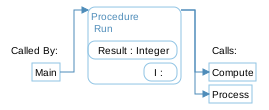
For a subprogram, entry, task type, or protected type, the same box can additionally show its parameters and local objects, the units that call it, and the units it calls. Rooted at the procedure Client.Run below, its local object Result and the loop parameter I appear inside the box, Main appears under Called By, and Compute/Process appear under Calls.
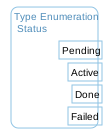
The same box format applies when an enumeration type, record type, task type, or protected type is selected directly, rather than reached through a containing package: an enumeration type lists its literals, a record type lists its components, a task type lists its entries, and a protected type lists its entries, subprograms, and private components.


Declaration - Assembly File
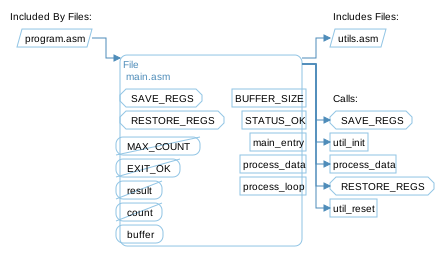
Show a diagram of a selected assembly file’s own declarations, plus what includes it, what it includes, and what it calls.
The main box lists the macros, symbols and labels, and constants and variables defined directly in the file.
Rooted at main.asm below, the box shows the macros SAVE_REGS and RESTORE_REGS; the symbols BUFFER_SIZE and STATUS_OK and the labels main_entry, process_data, and process_loop; and the constants and variables MAX_COUNT, EXIT_OK, result, count, and buffer. Included By Files shows program.asm, which includes main.asm; Includes Files shows utils.asm, which main.asm includes in turn. Calls shows everything main_entry and process_data invoke: the SAVE_REGS and RESTORE_REGS macros, and util_init/util_reset from utils.asm.
See the following code and corresponding graph
        INCLUDE "utils.asm"

* Macros
SAVE_REGS MACRO
        MOVEM.L D0-D2/A0-A1,-(A7)
        ENDM

RESTORE_REGS MACRO
        MOVEM.L (A7)+,D0-D2/A0-A1
        ENDM

* Symbols
BUFFER_SIZE EQU 256
STATUS_OK   EQU 0

        SECTION DATA

* Constants and variables
MAX_COUNT DC.W 10
EXIT_OK   DC.W 0
result    DC.L 0
count     DC.L 0
buffer    DS.B BUFFER_SIZE

        SECTION CODE

* Labels
main_entry
        SAVE_REGS
        JSR util_init
        JSR process_data
        RESTORE_REGS
        RTS

process_data
        MOVE.W MAX_COUNT,D0
process_loop
        ADDQ.L #1,result
        ADDQ.L #1,count
        DBRA D0,process_loop
        JSR util_reset
        RTS
Declaration - C Class
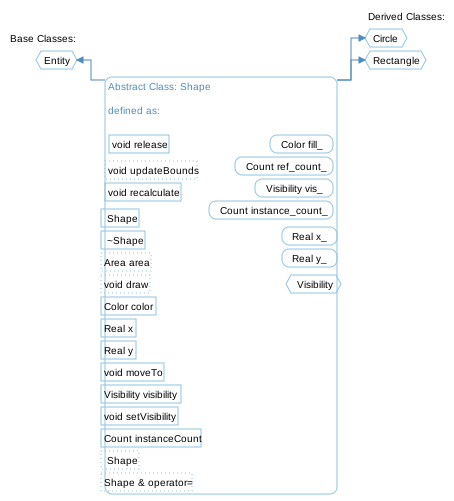
Show a diagram of a selected C/C++ class, struct, or union’s own members, plus its base and derived classes.
The main box lists private members at the top, protected members in the middle, and public members at the bottom, with functions on the left and data on the right; a nested enum is treated as a public member. Enabling Base Classes and Derived Classes adds the class’s immediate ancestors and descendants outside the main box.
Rooted at the abstract class Shape below (abstract because it declares the pure virtual functions area and draw), the box shows the private function release and private data fill_, ref_count_, vis_, and instance_count_; the protected functions updateBounds and recalculate and protected data x_ and y_; and the public constructor, destructor, area, draw, color, x, y, moveTo, visibility, setVisibility, the static instanceCount, the assignment operator, and the nested enum Visibility. Base Classes shows Entity; Derived Classes shows Circle and Rectangle.
See the following code and corresponding graph
class Entity {
private:
    static Count next_id_;
    void assignId();
protected:
    int id_;
    virtual void initialize() = 0;
public:
    Entity();
    virtual ~Entity();
    int id() const;
};

class Shape : public Entity {
private:
    Color     fill_;
    Count     ref_count_;
    void      release();
protected:
    Real               x_, y_;
    virtual void       updateBounds() = 0;
    virtual void       recalculate(Real tolerance);
public:
    enum Visibility { Visible, Hidden, Clipped };

    Shape(Real x, Real y, Color c);
    virtual ~Shape();
    virtual Area  area()  const = 0;
    virtual void  draw()  const = 0;
    Color         color() const;
    Real          x()     const;
    Real          y()     const;
    void          moveTo(Real nx, Real ny);
    Visibility    visibility() const;
    void          setVisibility(Visibility v);

    static Count  instanceCount();

private:
    Visibility vis_;
    static Count instance_count_;
};

class Circle : public Shape {
    // ...
};

class Rectangle : public Shape {
    // ...
};
Declaration - C Code File
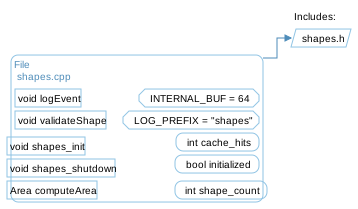
Show a diagram of a selected C/C++ source file’s own definitions, plus the header files it includes.
The main box lists the file’s non-static functions and global objects; enabling the Static option adds its static functions, static objects, macros, and other file-local types too.
Rooted at shapes.cpp below, the box shows the functions shapes_init, shapes_shutdown, and computeArea and the global object shape_count. With Static enabled, it also shows the static functions logEvent and validateShape, the static objects cache_hits and initialized, and the macros INTERNAL_BUF and LOG_PREFIX. Includes shows shapes.h, which the file includes.
See the following code and corresponding graph
#include "shapes.h"

#define INTERNAL_BUF   64
#define LOG_PREFIX     "shapes"

static int   cache_hits   = 0;
static bool  initialized  = false;

static void logEvent(const char* msg, int level) {
    (void)msg; (void)level;
    ++cache_hits;
}

static void validateShape(const Shape* s) {
    (void)s;
}

int shape_count = 0;

void shapes_init() {
    if (!initialized) {
        logEvent("shapes_init", 1);
        initialized = true;
    }
}

void shapes_shutdown() {
    logEvent("shapes_shutdown", 1);
    initialized = false;
    shape_count = 0;
}

Area computeArea(const void* shape, Count iterations, Real scale) {
    (void)iterations;
    Area total = 0.0;
    const Shape* s = static_cast<const Shape*>(shape);
    validateShape(s);
    if (s) {
        total = s->area() * scale;
        logEvent("computeArea", 2);
    }
    return total;
}
Declaration - C Header File
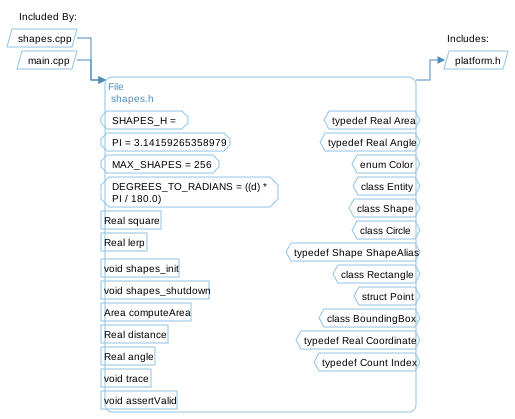
Show a diagram of a selected C/C++ header file’s own declarations, plus what includes it and what it includes.
The main box lists the file’s macros and non-static functions on the left and its objects and other types on the right — including anything declared inside a namespace in the file, not just what’s declared at file scope directly. Enabling External Functions adds a separate list of the functions the file declares but doesn’t define.
Rooted at shapes.h below, the left side of the box shows the macros SHAPES_H, PI, MAX_SHAPES, and DEGREES_TO_RADIANS and the inline function square; the right side shows the type aliases Area and Angle, the enum Color, the classes Entity, Shape, and Circle, the type alias ShapeAlias (for Shape), the class Rectangle, the struct Point, the class BoundingBox, and the type aliases Coordinate and Index — even though several of these are declared inside the namespace Geometry, not directly in the file. External Functions lists shapes_init, shapes_shutdown, computeArea, distance, angle, trace, and assertValid. Included By shows main.cpp and shapes.cpp; Includes shows platform.h.
See the following code and corresponding graph
#ifndef SHAPES_H
#define SHAPES_H

#include "platform.h"

#define PI                    3.14159265358979
#define MAX_SHAPES            256
#define DEGREES_TO_RADIANS(d) ((d) * PI / 180.0)

inline Real square(Real v) { return v * v; }

extern int shape_count;

typedef Real Area;
typedef Real Angle;

enum Color { Red, Green, Blue, Alpha };

void shapes_init();
void shapes_shutdown();
Area computeArea(const void* shape, Count iterations, Real scale);

namespace Geometry {
    namespace Detail {
        void trace(const char* msg, int level);
        void assertValid(bool condition, const char* context);
    }

    struct Point {
        Real x;
        Real y;
    };

    class BoundingBox {
    public:
        BoundingBox(Real x, Real y, Real w, Real h);
        bool contains(Point p) const;
        Real width() const;
        Real height() const;
    private:
        Real x_, y_, w_, h_;
    };

    typedef Real Coordinate;
    typedef Count Index;

    Real distance(Point a, Point b);
    Real angle(Point a, Point b);
    inline Real lerp(Real a, Real b, Real t)
        { return a + (b - a) * t; }
    static inline Real clamp(Real v, Real lo, Real hi)
        { return v < lo ? lo : (v > hi ? hi : v); }

    extern Real   scale_factor;
    extern Count  render_count;
}

class Entity {
private:
    static Count next_id_;
    void assignId();
protected:
    int id_;
    virtual void initialize() = 0;
public:
    Entity();
    virtual ~Entity();
    int id() const;
};

class Shape : public Entity {
private:
    Color     fill_;
    Count     ref_count_;
    void      release();
protected:
    Real               x_, y_;
    virtual void       updateBounds() = 0;
    virtual void       recalculate(Real tolerance);
public:
    enum Visibility { Visible, Hidden, Clipped };

    Shape(Real x, Real y, Color c);
    virtual ~Shape();
    virtual Area  area()  const = 0;
    virtual void  draw()  const = 0;
    Color         color() const;
    Real          x()     const;
    Real          y()     const;
    void          moveTo(Real nx, Real ny);
    Visibility    visibility() const;
    void          setVisibility(Visibility v);

    static Count  instanceCount();

private:
    Visibility vis_;
    static Count instance_count_;
};

class Circle : public Shape {
private:
    Real  radius_;
    Count segments_;
protected:
    void updateBounds() override;
    void recalculate(Real tolerance) override;
public:
    Circle(Real x, Real y, Real r, Color c);
    ~Circle() override;
    Area area()  const override;
    void draw()  const override;
    Real radius()      const;
    void setRadius(Real r);
    Geometry::BoundingBox bounds() const;
protected:
    void initialize() override;
};

typedef Shape ShapeAlias;

class Rectangle : public Shape {
private:
    Real width_, height_;
protected:
    void updateBounds() override;
    void recalculate(Real tolerance) override;
public:
    Rectangle(Real x, Real y, Real w, Real h, Color c);
    ~Rectangle() override;
    Area area()   const override;
    void draw()   const override;
    Real width()  const;
    Real height() const;
protected:
    void initialize() override;
};

#endif
Declaration - C Namespace
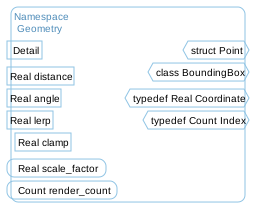
Show a diagram of a selected C++ namespace’s own declarations.
The main box lists nested namespaces at the top left, classes and structs at the top right, other types at the middle right, functions at the middle left, and objects at the bottom left.
Rooted at the namespace Geometry below, the box shows the nested namespace Detail; the struct Point and class BoundingBox; the type aliases Coordinate and Index; the functions distance, angle, lerp, and clamp; and the objects scale_factor and render_count.
See the following code and corresponding graph
namespace Geometry {

    namespace Detail {
        void trace(const char* msg, int level);
        void assertValid(bool condition, const char* context);
    }

    struct Point {
        Real x;
        Real y;
    };

    class BoundingBox {
    public:
        BoundingBox(Real x, Real y, Real w, Real h);
        bool contains(Point p) const;
        Real width() const;
        Real height() const;
    private:
        Real x_, y_, w_, h_;
    };

    typedef Real Coordinate;
    typedef Count Index;

    Real distance(Point a, Point b);
    Real angle(Point a, Point b);
    inline Real lerp(Real a, Real b, Real t)
        { return a + (b - a) * t; }
    static inline Real clamp(Real v, Real lo, Real hi)
        { return v < lo ? lo : (v > hi ? hi : v); }

    extern Real   scale_factor;
    extern Count  render_count;

} // namespace Geometry
Declaration - C# File
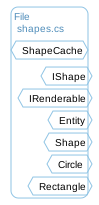
Show a diagram of a selected C# file’s own type declarations.
The main box lists the types declared directly in the file, grouped by accessibility: private types at the top, protected and internal types in the middle, and public types at the bottom.
Rooted at shapes.cs below, the box shows the public types IShape, IRenderable, Entity, Shape, Circle, and Rectangle, and the internal type ShapeCache.
See the following code and corresponding graph
namespace Geometry
{
    public interface IShape { /* ... */ }
    public interface IRenderable { /* ... */ }

    internal sealed class ShapeCache { /* ... */ }

    public abstract class Entity { /* ... */ }

    public abstract class Shape
        : Entity, IShape, IRenderable { /* ... */ }

    public sealed class Circle : Shape { /* ... */ }

    public sealed class Rectangle : Shape { /* ... */ }
}
Declaration - C# Type
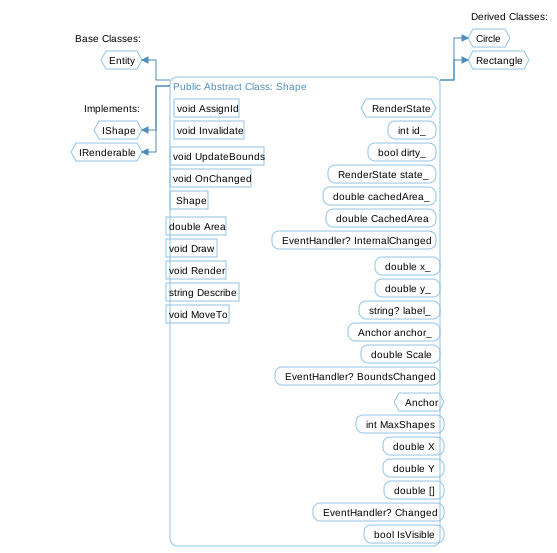
Show a diagram of a selected C# type’s own members, plus its base types, derived types, and interfaces.
This applies to any C# type declaration — class, struct, interface, record, delegate, tuple, or generic type parameter — though a delegate, tuple, or generic type parameter has no members, base types, or interfaces of its own, so the box is mostly empty for those. For a class, struct, interface, or record, the main box lists private members at the top, protected and internal members in the middle, and public members at the bottom, with methods on the left and fields, properties, indexers, events, and nested types on the right; a nested enum is treated as a public member. Enabling Base Classes and Derived Classes adds the type’s immediate ancestors and descendants outside the main box; Implements and Implemented By add the interfaces it implements and, for an interface, the types that implement it.
Rooted at the abstract class Shape below, the box shows the private members AssignId and Invalidate, the nested private class RenderState, and the private fields id_, dirty_, state_, and cachedArea_ and property CachedArea; the protected members UpdateBounds and OnChanged and the protected fields x_, y_, label_, and anchor_, property Scale, and event BoundsChanged; and the public members Area, Draw, Render, Describe, and MoveTo, the nested public enum Anchor, the public field MaxShapes, properties X, Y, and IsVisible, the indexer this[int], and the event Changed. Base Classes shows Entity; Derived Classes shows Circle and Rectangle; Implements shows IShape and IRenderable.
See the following code and corresponding graph
public interface IShape
{
    double Area();
    void   Draw();
}

public interface IRenderable
{
    void Render(double opacity);
    bool IsVisible { get; }
}

public abstract class Entity
{
    private static int nextId_ = 0;

    protected int Id { get; }

    protected Entity() { Id = ++nextId_; }

    public abstract string Describe();
}

public abstract class Shape : Entity, IShape, IRenderable
{
    private class RenderState
    {
        public bool   Active;
        public int    Frame;
        public double Opacity;
    }

    public enum Anchor {
        TopLeft, TopRight, BottomLeft, BottomRight, Center }

    private int         id_;
    private bool        dirty_;
    private RenderState state_;
    private double      cachedArea_;

    private double CachedArea
    {
        get => cachedArea_;
        set { cachedArea_ = value; dirty_ = false; }
    }

    private event EventHandler? InternalChanged;

    private void AssignId()    { id_ = Id; }
    private void Invalidate() {
        dirty_ = true;
        InternalChanged?.Invoke(this, EventArgs.Empty); }

    protected double  x_;
    protected double  y_;
    protected string? label_;
    protected Anchor  anchor_;

    protected double Scale { get; set; } = 1.0;

    protected event EventHandler? BoundsChanged;

    protected virtual void UpdateBounds()
        => BoundsChanged?.Invoke(this, EventArgs.Empty);
    protected virtual void OnChanged() => Invalidate();

    public static int   MaxShapes = 1024;

    public double X
    {
        get => x_;
        set { x_ = value; UpdateBounds(); }
    }

    public double Y
    {
        get => y_;
        set { y_ = value; UpdateBounds(); }
    }

    public double this[int axis]
    {
        get => axis == 0 ? x_ : y_;
        set { if (axis == 0) x_ = value;
              else y_ = value; UpdateBounds(); }
    }

    public event EventHandler? Changed;

    public bool IsVisible { get; set; } = true;

    public abstract double Area();
    public abstract void   Draw();
    public virtual  void   Render(double opacity) => Draw();
    public override string Describe()
        => $"{GetType().Name}({x_},{y_})";
    public void MoveTo(double nx, double ny)
    {
        x_ = nx; y_ = ny; UpdateBounds();
        Changed?.Invoke(this, EventArgs.Empty);
    }

    protected Shape(double x, double y)
    {
        x_ = x; y_ = y;
        state_ = new RenderState();
        anchor_ = Anchor.Center;
        AssignId();
    }
}

public sealed class Circle : Shape { /* ... */ }
public sealed class Rectangle : Shape { /* ... */ }
Declaration - Enum
Show a diagram of a selected enum’s enumerators.
The main box lists the enum’s enumerators.
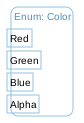
Rooted at the enum Color below, the box shows its enumerators Red, Green, Blue, and Alpha.
See the following code and corresponding graph
enum Color { Red, Green, Blue, Alpha };
Declaration - Fortran Common
Show a diagram of a selected Fortran common block or datapool’s own variables.
The main box lists the variables declared in the common block, along with their types.
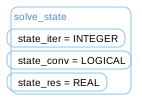
Rooted at solve_state below, the box shows its variables state_iter (INTEGER), state_conv (LOGICAL), and state_res (REAL).
See the following code and corresponding graph
integer :: state_iter
logical :: state_conv
real    :: state_res
common /solve_state/ state_iter, state_conv, state_res
Declaration - Fortran Derived Type
Show a diagram of a selected Fortran derived type, interface, or pointer’s own members.
The main box lists the type’s public, non-private components and functions on the left and its private ones on the right; type-bound procedures aren’t included, only the type’s own data components and any function or subroutine declared directly inside it.
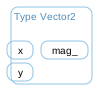
Rooted at the derived type Vector2 below, the box shows its public components x and y on the left and its private component mag_ on the right; its type-bound procedures normalize, length, and compute_mag aren’t shown, since they’re declared as ordinary functions inside geometry_mod rather than inside Vector2 itself.
See the following code and corresponding graph
type, public :: Vector2
    real, public :: x = 0.0
    real, public :: y = 0.0
    real, private :: mag_ = 0.0
contains
    procedure, public  :: normalize
    procedure, public  :: length
    procedure, private :: compute_mag
end type Vector2
Declaration - Fortran File
Show a diagram of a selected Fortran file’s own declarations, plus what includes it.
The main box lists the modules, programs, subroutines, functions, common blocks, and datapools defined directly in the file. Included By lists the subprograms that include the file.
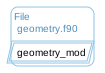
Rooted at geometry.f90 below, the box shows the module geometry_mod, the only thing the file defines.
See the following code and corresponding graph
module geometry_mod
    use constants_mod
    implicit none
    private

    integer, public :: max_vectors = 256

    real,    private :: tolerance_   = 1.0e-6
    logical, private :: initialized_ = .false.

    type, public :: Vector2
        real, public :: x = 0.0
        real, public :: y = 0.0
        real, private :: mag_ = 0.0
    contains
        procedure, public  :: normalize
        procedure, public  :: length
        procedure, private :: compute_mag
    end type Vector2

    type, private :: WorkBuffer
        integer :: size = 0
        real    :: data(64)
    end type WorkBuffer

    interface interpolate
        module procedure lerp_impl
    end interface interpolate

    public :: Vector2, transform, dot, interpolate, max_vectors

contains

    subroutine transform(v, angle)
        type(Vector2), intent(inout) :: v
        real,          intent(in)    :: angle
        real :: cosA, sinA, tmp
        cosA = cos(angle * DEG2RAD)
        sinA = sin(angle * DEG2RAD)
        tmp  = v%x * cosA - v%y * sinA
        v%y  = v%x * sinA + v%y * cosA
        v%x  = tmp
        v%mag_ = 0.0
    end subroutine transform

    real function dot(a, b)
        type(Vector2), intent(in) :: a, b
        dot = a%x * b%x + a%y * b%y
    end function dot

    real function lerp_impl(a, b, t)
        real, intent(in) :: a, b, t
        lerp_impl = a + (b - a) * t
    end function lerp_impl

    real function clamp_val(v, lo, hi)
        real, intent(in) :: v, lo, hi
        clamp_val = min(hi, max(lo, v))
    end function clamp_val

    subroutine normalize(self)
        class(Vector2), intent(inout) :: self
        real :: len
        len = self%compute_mag()
        if (len > tolerance_) then
            self%x    = self%x / len
            self%y    = self%y / len
            self%mag_ = 1.0
        end if
    end subroutine normalize

    real function length(self)
        class(Vector2), intent(in) :: self
        length = self%compute_mag()
    end function length

    real function compute_mag(self)
        class(Vector2), intent(in) :: self
        compute_mag = sqrt(self%x**2 + self%y**2)
    end function compute_mag

end module geometry_mod
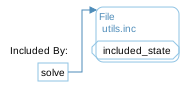
A file can also be reached only through an INCLUDE statement rather than compiled directly, as with utils.inc below. Its box shows the common block included_state, which the file defines directly, and Included By shows the subroutine solve, which includes it.
See the following code and corresponding graph
integer, parameter :: MAX_ITER  = 500
real,    parameter :: SMALL_VAL = 1.0e-10

integer :: included_calls
logical :: included_ready
common /included_state/ included_calls, included_ready
Declaration - Fortran Module
Show a diagram of a selected Fortran module’s own declarations, plus what uses it and what it uses.
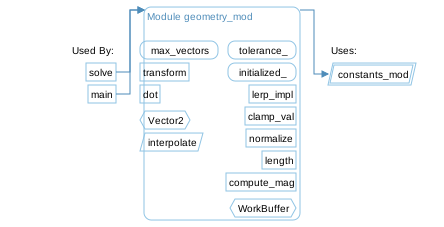
The main box lists what’s declared directly in the module: public subprograms and variables on the left, private ones on the right; public derived types and interfaces further down on the left, private ones on the right. Used By lists the programs and subprograms that use the module; Uses lists the other modules it uses.
Rooted at geometry_mod below, the box shows the public subroutine transform, function dot, and variable max_vectors; the private functions lerp_impl and clamp_val, variables tolerance_ and initialized_, and the type-bound procedures normalize, length, and compute_mag — private because none of them are named in the module’s own public list, even though normalize and length are exposed as public bindings on Vector2. The public derived type Vector2 and interface interpolate appear further down on the left; the private derived type WorkBuffer appears on the right. Used By shows solve and the program main; Uses shows constants_mod.
See the following code and corresponding graph
module constants_mod
    implicit none
    real, parameter :: PI      = 3.14159265358979
    real, parameter :: TWO_PI  = 6.28318530717959
    real, parameter :: DEG2RAD = PI / 180.0
    real, parameter :: RAD2DEG = 180.0 / PI
end module constants_mod

module geometry_mod
    use constants_mod
    implicit none
    private

    integer, public :: max_vectors = 256

    real,    private :: tolerance_   = 1.0e-6
    logical, private :: initialized_ = .false.

    type, public :: Vector2
        real, public :: x = 0.0
        real, public :: y = 0.0
        real, private :: mag_ = 0.0
    contains
        procedure, public  :: normalize
        procedure, public  :: length
        procedure, private :: compute_mag
    end type Vector2

    type, private :: WorkBuffer
        integer :: size = 0
        real    :: data(64)
    end type WorkBuffer

    interface interpolate
        module procedure lerp_impl
    end interface interpolate

    public :: Vector2, transform, dot, interpolate, max_vectors

contains

    subroutine transform(v, angle)
        type(Vector2), intent(inout) :: v
        real,          intent(in)    :: angle
        real :: cosA, sinA, tmp
        cosA = cos(angle * DEG2RAD)
        sinA = sin(angle * DEG2RAD)
        tmp  = v%x * cosA - v%y * sinA
        v%y  = v%x * sinA + v%y * cosA
        v%x  = tmp
        v%mag_ = 0.0
    end subroutine transform

    real function dot(a, b)
        type(Vector2), intent(in) :: a, b
        dot = a%x * b%x + a%y * b%y
    end function dot

    real function lerp_impl(a, b, t)
        real, intent(in) :: a, b, t
        lerp_impl = a + (b - a) * t
    end function lerp_impl

    real function clamp_val(v, lo, hi)
        real, intent(in) :: v, lo, hi
        clamp_val = min(hi, max(lo, v))
    end function clamp_val

    subroutine normalize(self)
        class(Vector2), intent(inout) :: self
        real :: len
        len = self%compute_mag()
        if (len > tolerance_) then
            self%x    = self%x / len
            self%y    = self%y / len
            self%mag_ = 1.0
        end if
    end subroutine normalize

    real function length(self)
        class(Vector2), intent(in) :: self
        length = self%compute_mag()
    end function length

    real function compute_mag(self)
        class(Vector2), intent(in) :: self
        compute_mag = sqrt(self%x**2 + self%y**2)
    end function compute_mag

end module geometry_mod

! solver.f90
subroutine solve(n, values, result, tol)
    use geometry_mod, only: dot, Vector2
    ! ...
end subroutine solve

! program.f90
program main
    use geometry_mod
    ! ...
end program main
Declaration - Fortran Subroutine
Show a diagram of a selected Fortran subprogram’s parameters, plus what it includes, uses, calls, and is called by.
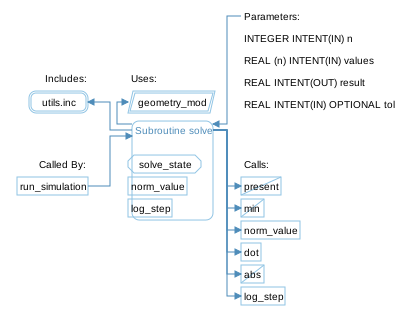
The main box lists what’s declared directly inside the subprogram: internal common blocks, functions, and subroutines. Includes lists the files it includes; Uses lists the modules it uses; Parameters lists its formal parameters; Called By lists what calls it; Calls lists what it calls, including intrinsic functions.
Rooted at the subroutine solve below, the box shows the common block solve_state and the internal functions norm_value and log_step, all declared directly inside solve. Includes shows utils.inc; Uses shows geometry_mod; Parameters shows n, values, result, and tol; Called By shows run_simulation; Calls shows present, min, norm_value, dot, abs, and log_step.
See the following code and corresponding graph
integer, parameter :: MAX_ITER  = 500
real,    parameter :: SMALL_VAL = 1.0e-10

integer :: included_calls
logical :: included_ready
common /included_state/ included_calls, included_ready

subroutine solve(n, values, result, tol)
    use geometry_mod, only: dot, Vector2
    implicit none
    include 'utils.inc'

    integer,        intent(in)  :: n
    real,           intent(in)  :: values(n)
    real,           intent(out) :: result
    real, optional, intent(in)  :: tol

    integer :: i
    real    :: tolerance, sum_val, w
    type(Vector2) :: v

    integer :: state_iter
    logical :: state_conv
    real    :: state_res
    common /solve_state/ state_iter, state_conv, state_res

    tolerance = SMALL_VAL
    if (present(tol)) tolerance = tol

    state_iter = 0
    state_conv = .false.
    result     = 0.0
    sum_val    = 0.0

    do i = 1, min(n, MAX_ITER)
        sum_val    = sum_val + norm_value(values(i), 1.0)
        state_iter = state_iter + 1
    end do

    v%x   = sum_val
    v%y   = 1.0
    w     = dot(v, v)
    if (abs(w) < tolerance) w = 1.0

    result     = sum_val / w
    state_res  = abs(result - values(1))
    state_conv = state_res < tolerance

    call log_step(state_iter)

contains

    real function norm_value(x, scale)
        real, intent(in) :: x, scale
        norm_value = x * scale
    end function norm_value

    subroutine log_step(step)
        integer, intent(in) :: step
        if (step > MAX_ITER) return
    end subroutine log_step

end subroutine solve
Declaration - Function
Show a diagram of a selected function’s parameters, plus what calls it and what it calls.
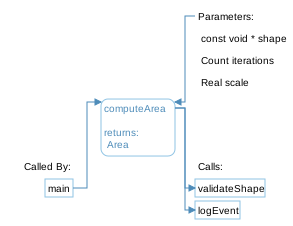
The main box names the function and its return type. Parameters lists its formal parameters; Called By lists what calls it; Calls lists what it calls.
Rooted at computeArea below, Parameters shows const void * shape, Count iterations, and Real scale; Called By shows main, which calls computeArea; Calls shows validateShape and logEvent, which computeArea calls in turn.
See the following code and corresponding graph
// main.cpp
Area ca = computeArea(&c, 10, Geometry::scale_factor);

// shapes.cpp
static void logEvent(const char* msg, int level) {
    (void)msg; (void)level;
    ++cache_hits;
}

static void validateShape(const Shape* s) {
    (void)s;
}

Area computeArea(const void* shape, Count iterations, Real scale) {
    (void)iterations;
    Area total = 0.0;
    const Shape* s = static_cast<const Shape*>(shape);
    validateShape(s);
    if (s) {
        total = s->area() * scale;
        logEvent("computeArea", 2);
    }
    return total;
}
Declaration - Java Class
Show a diagram of a selected Java class or interface’s own members, plus its superclass, subclasses, and interfaces.
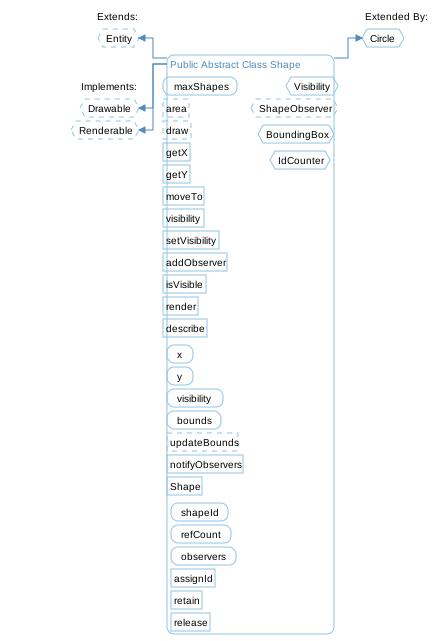
The main box lists private members at the top, protected members in the middle, and public members at the bottom, with methods and fields on the left and nested types on the right; a method with no body of its own (abstract, or declared but not implemented, as in an interface) is drawn with a dashed border. Enabling Extends and Extended By adds the type’s immediate superclass and subclasses outside the main box; Implements and Implemented By add the interfaces it implements and, for an interface, the classes that implement it.
Rooted at the abstract class Shape below, the box shows the private fields shapeId, refCount, and observers and private methods assignId, retain, and release, and the private nested class IdCounter; the protected fields x, y, visibility, and bounds and protected methods updateBounds (dashed, abstract) and notifyObservers, and the protected nested class BoundingBox; and the public field maxShapes, the public methods area and draw (dashed, abstract), getX, getY, moveTo, visibility, setVisibility, addObserver, isVisible, render, and describe, and the public nested enum Visibility and interface ShapeObserver (dashed). Extends shows Entity; Extended By shows Circle; Implements shows Drawable and Renderable (both dashed, since they’re interfaces).
See the following code and corresponding graph
public abstract class Entity {
    private static int nextId = 0;

    protected final int entityId;

    protected Entity() {
        this.entityId = ++nextId;
    }

    public    int    getId()      { return entityId; }
    public abstract String describe();

    static int allocateId() { return ++nextId; }
}

public interface Drawable {
    void   draw();
    double area();
    default String drawDescription() { return "Drawable"; }
}

interface Renderable {
    void    render(float alpha);
    boolean isVisible();
}

public abstract class Shape
    extends Entity implements Drawable, Renderable {

    public enum Visibility { VISIBLE, HIDDEN, CLIPPED }

    public interface ShapeObserver {
        void onShapeChanged(Shape shape);
    }

    public static int maxShapes = 1000;

    public abstract double area();
    public abstract void   draw();

    public double  getX()          { return x; }
    public double  getY()          { return y; }
    public void moveTo(double nx, double ny) {
        x = nx; y = ny; updateBounds(); }
    public Visibility visibility() { return visibility; }
    public void    setVisibility(Visibility v) { visibility = v; }
    public void addObserver(ShapeObserver obs) { observers.add(obs); }

    public boolean isVisible()
        { return visibility == Visibility.VISIBLE; }
    public void    render(float alpha) { if (isVisible()) draw(); }

    public String describe() {
        return getClass().getSimpleName() + "(" + x + "," + y + ")"; }

    protected static class BoundingBox {
        public double minX, minY, maxX, maxY;
        BoundingBox(double x, double y, double w, double h) {
            minX = x; minY = y; maxX = x + w; maxY = y + h;
        }
    }

    protected double     x, y;
    protected Visibility visibility = Visibility.VISIBLE;
    protected BoundingBox bounds;

    protected abstract void  updateBounds();
    protected void           notifyObservers() {
        for (ShapeObserver o : observers) o.onShapeChanged(this);
    }

    private static class IdCounter {
        private static int count = 0;
        static int next() { return ++count; }
    }

    private int          shapeId;
    private int          refCount   = 0;
    private List<ShapeObserver> observers = new ArrayList<>();

    private void assignId()   { shapeId = IdCounter.next(); }
    private void retain()     { refCount++; }
    private void release()    { if (--refCount < 0) refCount = 0; }

    protected Shape(double x, double y) {
        super();
        this.x = x;
        this.y = y;
        assignId();
    }
}

public class Circle extends Shape {

    private double radius;

    public Circle(double x, double y, double radius) {
        super(x, y);
        this.radius = radius;
    }

    public double  getRadius()     { return radius; }
    public void    setRadius(double r) { radius = r; updateBounds(); }

    @Override
    public double area() { return Math.PI * radius * radius; }

    @Override
    public void    draw()          { }

    @Override
    protected void updateBounds()  {
        bounds = new BoundingBox(
            x - radius, y - radius, radius * 2, radius * 2);
    }
}
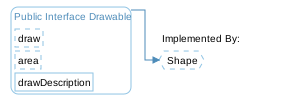
Rooted at the interface Drawable below, the box shows its methods draw and area (dashed, since interface methods have no body by default) and drawDescription (not dashed, since it’s a default method with its own implementation). Implemented By shows Shape (dashed, since Shape re-declares draw and area as abstract rather than implementing them itself).
See the following code and corresponding graph
public interface Drawable {
    void   draw();
    double area();
    default String drawDescription() { return "Drawable"; }
}

interface Renderable {
    void    render(float alpha);
    boolean isVisible();
}
Declaration - Java File
Show a diagram of a selected Java file’s own top-level type declarations, plus what it imports.
Enabling Public Members and Default Members lists the file’s top-level classes and interfaces, split by accessibility: public types on the left, package-private (default) types on the right. Imports lists the packages and classes the file imports, including java.lang, which every Java file imports implicitly.
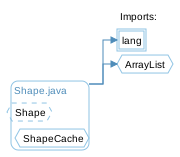
Rooted at Shape.java below, the box shows the public class Shape at the top and the default class ShapeCache at the bottom. Imports shows java.lang along with ArrayList, from the file’s explicit import statements.
See the following code and corresponding graph
import java.util.List;
import java.util.ArrayList;

public abstract class Shape
    extends Entity implements Drawable, Renderable {
    /* ... */
}

class ShapeCache {
    /* ... */
}
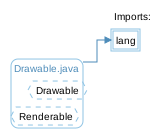
Rooted at Drawable.java below, the box shows the public interface Drawable at the top and the default interface Renderable at the bottom. Imports shows only the implicit java.lang package, since the file has no explicit import statements.
See the following code and corresponding graph
public interface Drawable {
    void   draw();
    double area();
    default String drawDescription() { return "Drawable"; }
}

interface Renderable {
    void    render(float alpha);
    boolean isVisible();
}
Declaration - Jovial File
Show a diagram of a selected Jovial file or compool module’s own declarations, plus what it accesses, is accessed by, and calls.
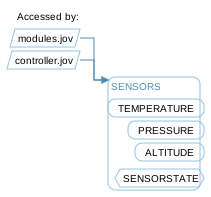
The main box lists the compool modules and external subroutines declared directly in the selected file or module on the left, and external variables and types on the right. Accessed by and Accesses list the files or modules that access, or are accessed by, a compool through a COMPOOL declaration; Calls lists the subroutines called.
Rooted at the compool module SENSORS below, the box shows its external variables TEMPERATURE, PRESSURE, and ALTITUDE and its external type SENSORSTATE. Accessed by shows controller.jov and modules.jov, both of which declare !COMPOOL('SENSORS') to access it.
See the following code and corresponding graph
"Shared sensor data compool"
COMPOOL SENSORS;

ITEM TEMPERATURE U;
ITEM PRESSURE    U;
ITEM ALTITUDE    U;

TYPE SENSORSTATE STATUS(V(OFFLINE), V(READY), V(ACTIVE));

TERM
Rooted at the file sensors.jov below, the box shows the compool module SENSORS, which the file declares.
See the following code and corresponding graph
"Shared sensor data compool"
COMPOOL SENSORS;

ITEM TEMPERATURE U;
ITEM PRESSURE    U;
ITEM ALTITUDE    U;

TYPE SENSORSTATE STATUS(V(OFFLINE), V(READY), V(ACTIVE));

TERM

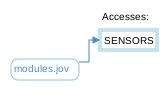
Rooted at the file modules.jov below, Accesses shows SENSORS, which the file’s two programs each access via !COMPOOL('SENSORS'); neither ACQUIRE nor PROCESS appears as a module itself, since a Jovial module is a compool block, not a program.
See the following code and corresponding graph
START
   !COMPOOL('SENSORS');
   PROGRAM ACQUIRE;
   BEGIN
   "..."
   END
TERM

START
   !COMPOOL('SENSORS');
   PROGRAM PROCESS;
   BEGIN
   "..."
   END
TERM
Declaration - Pascal Class
Show a diagram of a selected Pascal class or interface’s own members, plus its ancestor and descendant classes and interfaces.
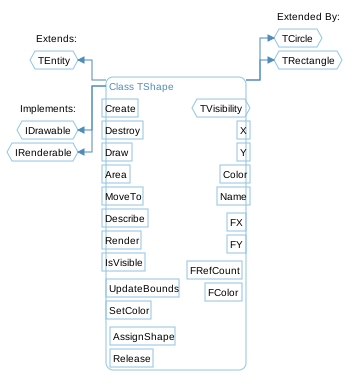
The main box lists private members at the top, protected members in the middle, and public members at the bottom, with methods on the left and properties, published members, and nested types on the right. Enabling Extends and Extended By adds the class’s immediate ancestor and descendants outside the main box; Implements and Implemented By add the interfaces it implements and, for an interface, the classes that implement it.
Rooted at the abstract class TShape below, the box shows the private methods AssignShape and Release and private data FRefCount and FColor; the protected methods UpdateBounds and SetColor and protected data FX and FY; and the public methods Create, Destroy, Draw, Area, MoveTo, Describe, Render, and IsVisible, the nested type TVisibility, and the properties X, Y, Color, and Name. Extends shows TEntity; Extended By shows TCircle and TRectangle; Implements shows IDrawable and IRenderable.
See the following code and corresponding graph
type
  IDrawable = interface
    procedure Draw;
    function  Area: Double;
  end;

  IRenderable = interface(IDrawable)
    procedure Render(Alpha: Single);
    function  IsVisible: Boolean;
  end;

  TEntity = class
  private
    FId: Integer;
  protected
    procedure Initialize; virtual;
  public
    constructor Create;
    destructor  Destroy; override;
    function    Id: Integer;
    function    Describe: string; virtual; abstract;
  end;

  TShape = class(TEntity, IDrawable, IRenderable)
  private
    FRefCount: Integer;
    FColor:    string;
    procedure AssignShape;
    procedure Release;
  protected
    FX, FY: Double;
    procedure UpdateBounds; virtual;
    procedure SetColor(const AValue: string);
  public
    type TVisibility = (vsVisible, vsHidden, vsClipped);
  public
    constructor Create(AX, AY: Double); virtual;
    destructor  Destroy; override;
    procedure   Draw; virtual; abstract;
    function    Area: Double; virtual; abstract;
    procedure   MoveTo(AX, AY: Double);
    function    Describe: string; override;
    procedure   Render(Alpha: Single); virtual;
    function    IsVisible: Boolean; virtual;
    property X:     Double read FX     write FX;
    property Y:     Double read FY     write FY;
    property Color: string read FColor write SetColor;
  published
    property Name: string read FColor;
  end;

  TCircle = class(TShape)
  private
    FRadius: Double;
  public
    constructor Create(AX, AY, ARadius: Double); reintroduce;
    procedure   Draw; override;
    function    Area: Double; override;
    property Radius: Double read FRadius write FRadius;
  end;

  TRectangle = class(TShape)
  private
    FWidth, FHeight: Double;
  public
    constructor Create(AX, AY, AWidth, AHeight: Double); reintroduce;
    procedure   Draw; override;
    function    Area: Double; override;
    property Width:  Double read FWidth  write FWidth;
    property Height: Double read FHeight write FHeight;
  end;
Declaration - Pascal CompUnit Unit
Show a diagram of a selected Pascal compilation unit’s own declarations, plus what it inherits and calls.
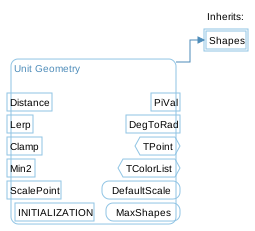
The main box lists the functions and procedures declared directly in the unit on the left, and its constants, types, and variables on the right. Inherits and Inherited by list the units named in the unit’s uses clause, or that in turn use it; Calls lists what the unit’s routines call.
Rooted at the unit Geometry below, the box shows the functions Distance, Lerp, Clamp, and Min2, the function ScalePoint (which itself contains the local nested procedure NormalizeAxis), and the unit’s initialization block; the constants PiVal and DegToRad, the types TPoint and TColorList, and the variables DefaultScale and MaxShapes appear on the right. Clamp and Min2 are pulled in from common.inc through an $INCLUDE directive, so they count as part of Geometry itself. Inherits shows Shapes, from the unit’s uses clause.
See the following code and corresponding graph
unit Geometry;

interface

uses
  Shapes;

const
  PiVal    = 3.14159265358979;
  DegToRad = PiVal / 180.0;

type
  TPoint = record
    X, Y: Double;
  end;

  TColorList = array of string;

var
  DefaultScale: Double;
  MaxShapes:    Integer;

function Distance(const A, B: TPoint): Double;
function Lerp(A, B, T: Double): Double;
function Clamp(V, Lo, Hi: Double): Double;
function Min2(A, B: Double): Double;
function ScalePoint(const P: TPoint; Factor: Double): TPoint;

implementation

{$INCLUDE 'common.inc'}

function Distance(const A, B: TPoint): Double;
var
  DX, DY: Double;
begin
  DX := A.X - B.X;
  DY := A.Y - B.Y;
  Result := Sqrt(DX * DX + DY * DY);
end;

function Lerp(A, B, T: Double): Double;
begin
  Result := A + (B - A) * Clamp(T, 0.0, 1.0);
end;

function ScalePoint(const P: TPoint; Factor: Double): TPoint;

  procedure NormalizeAxis(var V: Double; Scale: Double);
  begin
    V := V * Scale;
  end;

begin
  Result := P;
  NormalizeAxis(Result.X, Factor);
  NormalizeAxis(Result.Y, Factor);
end;

initialization
  DefaultScale := 1.0;
  MaxShapes    := 256;

end.
Declaration - Pascal File Include
Show a diagram of a selected Pascal file’s own declarations, plus what includes it.
The main box lists the functions, procedures, and compilation units defined directly in the file. Included By lists the files that include it through an $INCLUDE directive.
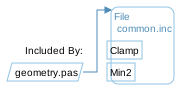
Rooted at common.inc below, the box shows the functions Clamp and Min2, which the file defines. Included By shows geometry.pas, which includes the file.
See the following code and corresponding graph
function Clamp(V, Lo, Hi: Double): Double;
begin
  if V < Lo then Result := Lo
  else if V > Hi then Result := Hi
  else Result := V;
end;

function Min2(A, B: Double): Double;
begin
  if A < B then Result := A else Result := B;
end;
Declaration - Pascal Sql Table
Show a diagram of a selected embedded SQL table’s own columns.
The main box lists the table’s columns.
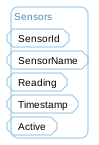
Rooted at the table Sensors below, the box shows its columns SensorId, SensorName, Reading, Timestamp, and Active.
See the following code and corresponding graph
EXEC SQL CREATE TABLE Sensors (
    SensorId    INTEGER,
    SensorName  VARCHAR(64),
    Reading     FLOAT,
    Timestamp   INTEGER,
    Active      INTEGER
);
Declaration - Python Class
Show a diagram of a selected Python class’s own methods and variables, plus its base and derived classes.
The main box lists the class’s methods on the left and its class and instance variables on the right; Python has no visibility keywords, so a name starting with an underscore is treated the same as any other member. Enabling Extends and Extended By adds the class’s immediate base classes and subclasses outside the main box.
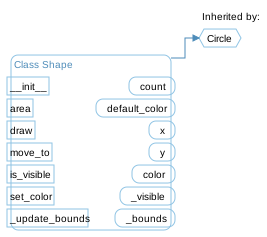
Rooted at the class Shape below, the box shows its methods __init__, area, draw, move_to, is_visible, set_color, and _update_bounds, and its variables count, default_color, x, y, color, _visible, and _bounds. Shape has no explicit base class, so nothing appears under Extends; Extended By shows Circle.
See the following code and corresponding graph
class Shape:
    count         = 0
    default_color = Color.RED

    def __init__(self, x, y, color=Color.RED):
        self.x      = x
        self.y      = y
        self.color  = color
        self._visible = True
        self._bounds  = None
        Shape.count  += 1

    def area(self):
        raise NotImplementedError

    def draw(self):
        raise NotImplementedError

    def move_to(self, x, y):
        self.x = x
        self.y = y
        self._update_bounds()

    def is_visible(self):
        return self._visible

    def set_color(self, color):
        self.color = color

    def _update_bounds(self):
        pass


class Circle(Shape):
    def __init__(self, x, y, radius, color=Color.RED):
        super().__init__(x, y, color)
        self.radius = radius

    def area(self):
        return PI * self.radius ** 2

    def draw(self):
        pass

    def scale(self, factor):
        self.radius *= clamp(factor, 0.01, 100.0)
Declaration - Python File
Show a diagram of a selected Python file’s own top-level declarations, plus what imports it and what it imports.
The main box lists the top-level functions defined directly in the file on the left, and its top-level classes and variables on the right. Used By Files and Uses Files list the files that import the file, or that it imports; Calls lists what the file’s top-level code calls.
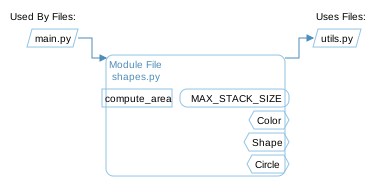
Rooted at shapes.py below, the box shows the function compute_area on the left, and the variable MAX_STACK_SIZE and the classes Color, Shape, and Circle on the right. Used By Files shows main.py, which imports shapes; Uses Files shows utils.py, which shapes.py imports from.
See the following code and corresponding graph
from utils import PI, clamp

MAX_STACK_SIZE = 100


def compute_area(shape):
    ...


class Color:
    RED   = 0
    GREEN = 1
    BLUE  = 2
    ALPHA = 3


class Shape:
    count         = 0
    default_color = Color.RED

    def __init__(self, x, y, color=Color.RED):
        ...

    def area(self):
        ...

    def draw(self):
        ...

    def move_to(self, x, y):
        ...

    def is_visible(self):
        ...

    def set_color(self, color):
        ...

    def _update_bounds(self):
        ...


class Circle(Shape):
    def __init__(self, x, y, radius, color=Color.RED):
        ...

    def area(self):
        ...

    def draw(self):
        ...

    def scale(self, factor):
        ...
Declaration - Web Class
Show a diagram of a selected PHP or JavaScript class, or PHP interface’s own members, plus its base classes, derived classes, and interfaces.
The main box lists private members at the top, protected members in the middle, and public members at the bottom, with methods on the left and properties and constants on the right; PHP has all three visibility levels, while JavaScript only distinguishes private (#-prefixed) from public. Enabling Base Classes and Derived Classes adds the type’s immediate ancestors and descendants outside the main box; Implements and Implemented By add the PHP interfaces it implements and, for an interface, the classes that implement it.
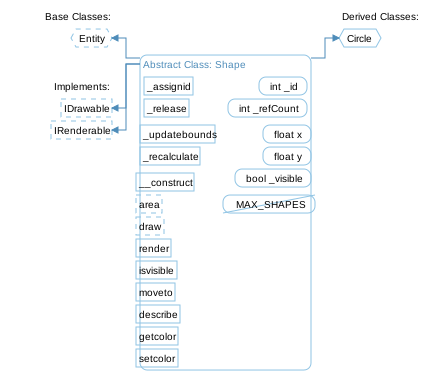
Rooted at the abstract PHP class Shape below, the box shows the private methods _assignId and _release and private properties $_id and $_refCount; the protected methods _updateBounds and _recalculate and protected properties $x, $y, and $_visible; and the public methods __construct, area and draw (both abstract), render, isVisible, moveTo, describe, getColor, and setColor, and the public constant MAX_SHAPES. Base Classes shows Entity (abstract); Derived Classes shows Circle; Implements shows IDrawable and IRenderable.
See the following code and corresponding graph
interface IBase {
    public function describe(): string;
}

interface IDrawable extends IBase {
    public function draw(): void;
    public function area(): float;
}

interface IRenderable {
    public function render(float $alpha): void;
    public function isVisible(): bool;
}

abstract class Entity {
    private static int $nextId = 0;
    protected int $entityId;

    public function __construct() {
        $this->entityId = ++self::$nextId;
    }
}

abstract class Shape extends Entity
    implements IDrawable, IRenderable {
    const MAX_SHAPES = 256;

    private int $_id;
    private int $_refCount;

    protected float $x;
    protected float $y;
    protected bool $_visible;

    private function _assignId(): void {
        $this->_id = rand(1, 9999);
    }

    private function _release(): void {
        $this->_refCount--;
    }

    protected function _updateBounds(): void {}

    protected function _recalculate(): void {}

    public function __construct(float $x, float $y) {
        parent::__construct();
        $this->x = $x;
        $this->y = $y;
        $this->_visible = true;
        $this->_refCount = 1;
        $this->_assignId();
    }

    abstract public function area(): float;
    abstract public function draw(): void;

    public function render(float $alpha): void {}

    public function isVisible(): bool {
        return $this->_visible;
    }

    public function moveTo(float $x, float $y): void {
        $this->x = clamp($x, -1000.0, 1000.0);
        $this->y = clamp($y, -1000.0, 1000.0);
        $this->_updateBounds();
    }

    public function describe(): string {
        return "Shape({$this->x}, {$this->y})";
    }

    public function getColor(): string { return "black"; }
    public function setColor(string $color): void {}
}

class Circle extends Shape {
    private float $radius;

    public function __construct(float $x, float $y, float $radius) {
        parent::__construct($x, $y);
        $this->radius = clamp($radius, 0.01, 1000.0);
    }

    public function area(): float {
        return PI * $this->radius ** 2;
    }

    public function draw(): void {}

    public function scale(float $factor): void {
        $this->radius *= clamp($factor, 0.01, 100.0);
    }
}
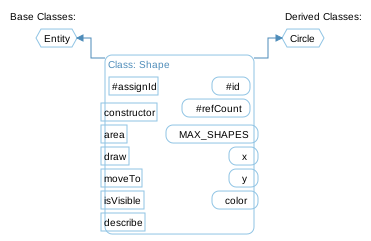
Rooted at the JavaScript class Shape below, the box shows the private method #assignId and private properties #id and #refCount; and the public methods constructor, area, draw, moveTo, isVisible, and describe, and the public properties MAX_SHAPES, x, y, and color. JavaScript has no protected members, so the middle of the box is empty here. Base Classes shows Entity; Derived Classes shows Circle.
See the following code and corresponding graph
class Entity {
    static #nextId = 0;
    #entityId;

    constructor() {
        this.#entityId = ++Entity.#nextId;
    }

    describe() { return `Entity(${this.#entityId})`; }
}

class Shape extends Entity {
    static MAX_SHAPES = 256;

    #id;
    #refCount;

    x = 0;
    y = 0;
    color = 0;

    constructor(x, y, color = 0) {
        super();
        this.x = x;
        this.y = y;
        this.color = color;
        this.#refCount = 1;
        this.#assignId();
    }

    #assignId() {
        this.#id = Math.floor(Math.random() * 9999);
    }

    area() { return 0; }
    draw() {}

    moveTo(x, y) {
        this.x = clamp(x, -1000, 1000);
        this.y = clamp(y, -1000, 1000);
    }

    isVisible() { return true; }

    describe() { return `Shape(${this.x}, ${this.y})`; }
}

class Circle extends Shape {
    #radius;

    constructor(x, y, radius, color = 0) {
        super(x, y, color);
        this.#radius = clamp(radius, 0.01, 1000);
    }

    area() { return Math.PI * this.#radius ** 2; }
    draw() {}

    scale(factor) {
        this.#radius *= clamp(factor, 0.01, 100);
    }
}
Declaration - Web File
Show a diagram of a selected PHP or JavaScript file’s own top-level declarations, plus what requires or imports it, and what it requires or imports.
The main box lists the file’s top-level functions on the left, and its top-level classes, constants, and variables on the right; PHP interfaces aren’t included, only classes. Used By Files and Uses Files list the files that require, import, link, or use it, or that it in turn requires, imports, links, or uses; Calls lists what the file’s top-level code calls.
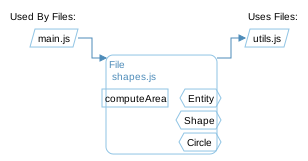
Rooted at shapes.js below, the box shows the function computeArea on the left, and the classes Entity, Shape, and Circle on the right. Used By Files shows main.js, which imports shapes.js; Uses Files shows utils.js, which shapes.js imports from.
See the following code and corresponding graph
import { clamp } from './utils.js';

export function computeArea(shape) {
    return shape.area();
}

class Entity {
    /* ... */
}

class Shape extends Entity {
    /* ... */
}

class Circle extends Shape {
    /* ... */
}

export { Entity, Shape, Circle };
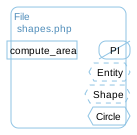
Rooted at shapes.php below, the box shows the function compute_area on the left, and the constant PI and the classes Entity and Shape (both dashed, since they’re abstract) and Circle (solid, concrete) on the right; the interfaces IBase, IDrawable, and IRenderable declared in the same file don’t appear, since this view only lists classes and constants, not interfaces. Used By Files shows app.php, which requires shapes.php; Uses Files shows utils.php, which shapes.php requires.
See the following code and corresponding graph
require_once 'utils.php';

const PI = 3.14159265358979;

function compute_area(Shape $shape): float {
    return $shape->area();
}

interface IBase {
    public function describe(): string;
}

interface IDrawable extends IBase {
    public function draw(): void;
    public function area(): float;
}

interface IRenderable {
    public function render(float $alpha): void;
    public function isVisible(): bool;
}

abstract class Entity {
    /* ... */
}

abstract class Shape extends Entity
    implements IDrawable, IRenderable {
    /* ... */
}

class Circle extends Shape {
    /* ... */
}