
Declared In is one of the interactive graphs Understand can draw of your code — call trees, dependencies, control flow, and more.
Declared In
Languages: AdaTargets: Packages, Subprograms
Variants: Classic, Cluster, Compare, Relationship, Simplified
Show the scope a selected unit is declared inside, and its own enclosing scope in turn.
For a selected task, protected object, package, subprogram, entry, or type, this shows an edge to the package, task, or protected object it's declared inside, then recurses upward into that scope's own enclosing scope, building a multi-level tree up to the top-level package.
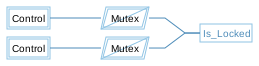
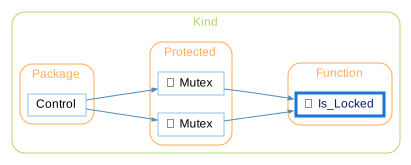
Rooted at Is_Locked below, the graph shows an edge to Mutex, then continues up to Control. The inverse graph, Declaration Tree, shows the reverse relationship — everything declared inside the selected scope.
See the following code and corresponding graph
package Control is

   protected Mutex is
      entry Acquire;
      procedure Release;
      function Is_Locked return Boolean;
   private
      Locked : Boolean := False;
   end Mutex;

end Control;

package body Control is

   protected body Mutex is
      entry Acquire when not Locked is
      begin
         Locked := True;
      end Acquire;

      procedure Release is
      begin
         Locked := False;
      end Release;

      function Is_Locked return Boolean is
      begin
         return Locked;
      end Is_Locked;
   end Mutex;

end Control;
Declared In - Classic
The Classic variant is similar to the Simplified variant, showing all relationships in a simple tree, but it uses a custom layout algorithm instead of Graphviz.
Declared In - Cluster
The Cluster variant groups entities by their containing class/file/architecture.
Declared In - Compare
The Compare variant shows how the graph has changed relative to the project's comparison database.

Declared In - Relationship
The Relationship variant filters the graph to only paths connecting the two entities.
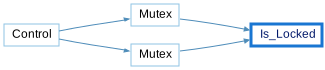
Declared In - Simplified
The Simplified variant shows all relationships in a simple tree (no clusters)
