
Type Derived From is one of the interactive graphs Understand can draw of your code — call trees, dependencies, control flow, and more.
Type Derived From
Languages: AdaTargets: Types
Variants: Classic, Cluster, Compare, Relationship, Simplified
Show the Ada types a selected type is directly or indirectly derived from.
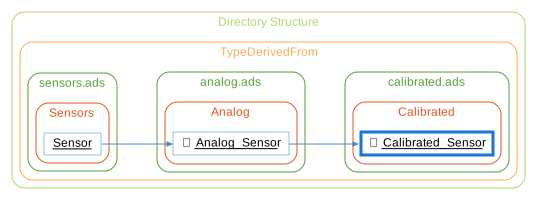
For a selected Ada tagged type, this shows an edge to the type it directly derives from, then recurses upward into that type’s own parent, building a multi-level ancestry chain.
Rooted at Calibrated_Sensor below, the graph shows an edge to its parent, Analog_Sensor, then continues up to Sensor. The inverse graph, Type Tree, shows the reverse relationship — everything derived from the selected type, directly or indirectly.
See the following code and corresponding graph
package Sensors is

   type Sensor is tagged record
      Id     : Positive := 1;
      Active : Boolean  := False;
   end record;

end Sensors;

with Sensors;

package Analog is

   type Analog_Sensor is new Sensors.Sensor with record
      Raw_Value : Float := 0.0;
      Min_Range : Float := 0.0;
      Max_Range : Float := 1.0;
   end record;

end Analog;

with Analog;

package Calibrated is

   type Calibrated_Sensor is new Analog.Analog_Sensor with record
      Offset : Float := 0.0;
      Scale  : Float := 1.0;
   end record;

end Calibrated;
Type Derived From - Classic
The Classic variant is similar to the Simplified variant, showing all relationships in a simple tree, but it uses a custom layout algorithm instead of Graphviz.

Type Derived From - Cluster
The Cluster variant groups entities by their containing class/file/architecture.
Type Derived From - Compare
The Compare variant shows how the graph has changed relative to the project's comparison database.

Type Derived From - Relationship
The Relationship variant filters the graph to only paths connecting the two entities.

Type Derived From - Simplified
The Simplified variant shows all relationships in a simple tree (no clusters)
