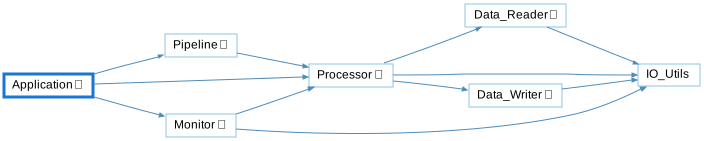
With is one of the interactive graphs Understand can draw of your code — call trees, dependencies, control flow, and more.
With
Languages: AdaTargets: Packages, Subprograms
Variants: Classic, Cluster, Compare, Relationship, Simplified
Show the Ada packages a selected package, subprogram, task, or protected object withs, directly or indirectly.
For a selected Ada unit, this shows an edge to each package named in one of its with clauses — whether the clause appears on the unit’s spec or its body — then recurses into each of those packages’ own with clauses, building a multi-level tree.
Rooted at Application below, the graph shows edges to Pipeline and Monitor (withed in Application’s spec) and to Processor (withed separately in Application’s body). Processor in turn withs Data_Reader and Data_Writer (from its spec) and IO_Utils (from its body); Pipeline and Monitor each with Processor too, continuing the same pattern. IO_Utils withs nothing further, ending the chain. The inverse graph, Withby, shows the reverse relationship — everything that withs the selected unit, directly or indirectly.
See the following code and corresponding graph
// application.ads
with Pipeline;
with Monitor;

// application.adb
with Processor;

// pipeline.ads
with Processor;

// monitor.ads
with Processor;

// monitor.adb
with IO_Utils;

// processor.ads
with Data_Reader;
with Data_Writer;

// processor.adb
with IO_Utils;

// data_reader.ads
with IO_Utils;

// data_writer.ads
with IO_Utils;

// io_utils.ads
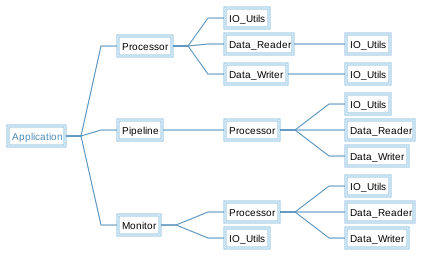
With - Classic
The Classic variant is similar to the Simplified variant, showing all relationships in a simple tree, but it uses a custom layout algorithm instead of Graphviz.
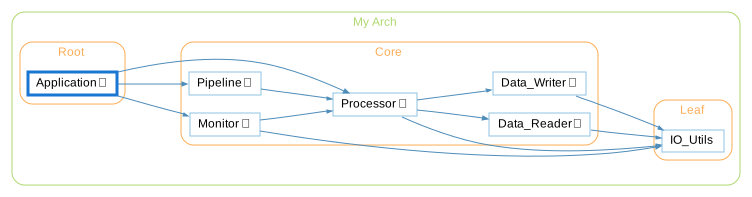
With - Cluster
The Cluster variant groups entities by their containing class/file/architecture.
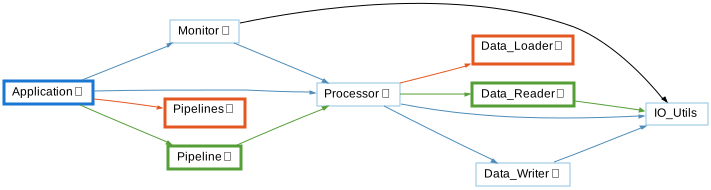
With - Compare
The Compare variant shows how the graph has changed relative to the project's comparison database.
With - Relationship
The Relationship variant filters the graph to only paths connecting the two entities.
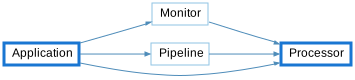
With - Simplified
The Simplified variant shows all relationships in a simple tree (no clusters)