
Data Sequence Diagram is one of the interactive graphs Understand can draw of your code — call trees, dependencies, control flow, and more.
Data Sequence Diagram
Languages: C, C++Targets: Functions
Show the relationships between data in a function
Wondering what "impact" an object has? The Inverse Variable Tracker graph is a great view of all the places a variable is used in an assignment. But it doesn't catch things like:
if (variable1) variable2 = ...;
The Input Output Diagram does show conditionals but isn't very detailed
This graph hijacks the "UML Sequence Diagram" layout to show data interactions within a function. Uses, Sets, and Modifications of data show up as activation boxes along the data's lifeline, colored by reference kind.
  unsigned int in_global;
  unsigned int out_global;
  unsigned int in_out_global;
  int inOutDemo(
    int in,
    int *in_out_1,
    int &in_out_2,
    int* out_1,
    int & out_2)
  {
    // direct assignments
    *out_1 = *in_out_1;
    out_2 = in_out_2;
    out_global = in_out_global;

    // Things that are both inputs and outputs
    *in_out_1 = in;
    in_out_2 = in;
    in_out_global = in_global;

    // Conditional influencing return value
    if (in > in_global) {
      int local = in * 2;
      return local;
    }

    // Returns work like assignments
    return in_out_global + in_out_2;
  }
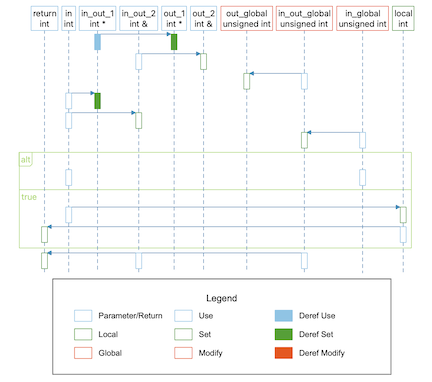
Note that because the "UML Sequence Diagram" layout was written specifically for the UML Sequence Diagram and was not intended to be used in other contexts, there are some limitations. The assignment edges man not be visible in the Understand GUI in builds before 1242. Assignment edges may be misaligned when there is nesting, and are not clear when multiple variables are part of the expression. Also, the layout doesn't support changing shapes, so the objects along the top are colored to indicate parameters, globals, and locals, rather than using the more standard rounded rectangle, oval, and rectangle shapes.
This variant is a plugin. It can be enabled/disabled from the Plugin Manager.