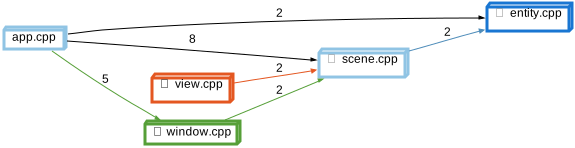
Depended On By is one of the interactive graphs Understand can draw of your code — call trees, dependencies, control flow, and more.
Depended On By
Languages: AnyTargets: Classes, Files
Variants: Classic, Cluster, Compare
Show the files or classes that depend on the selected file or class.
Dependencies map references to their owning file, class, or architecture. So a file's dependencies are the other files that own entities it references. For example, if a function defined in fileA calls a function defined in fileB, then fileA depends on fileB. References that contribute to dependencies vary by language, but generally include call, set, use, modify, and type references.
Dependencies always stay at the same grouping: file will only depend on other files, classes on other classes, and architectures on other architectures within the same root architecture.
Depended On By - Classic
Rooted at entity.cpp in the sample project, the graph shows two direct dependents — scene.cpp through 1 reference (a call to the update() function defined in entity.cpp), and app.cpp through 1 reference (a call to the Entity constructor defined in entity.cpp). In the next level, the two dependents of scene.cpp are shown — window.cpp through 2 references and app.cpp through 4 references. Finally, window.cpp is depended on by app.cpp through 5 references. See Depends On for the reverse direction.
The Classic variant shows the relationship as a simple tree (no clusters) using a custom layout algorithm instead of Graphviz.

Depended On By - Cluster
Rooted at entity.cpp in the sample project, the graph shows two direct dependents — scene.cpp through 1 reference (a call to the update() function defined in entity.cpp), and app.cpp through 1 reference (a call to the Entity constructor defined in entity.cpp). In the next level, the two dependents of scene.cpp are shown — window.cpp through 2 references and app.cpp through 4 references. Finally, window.cpp is depended on by app.cpp through 5 references. See Depends On for the reverse direction.
The Cluster variant shows each file/class once. In the GUI, the files/classes can be expanded to show the entities for each reference.

Depended On By - Compare
Rooted at entity.cpp in the sample project, the graph shows two direct dependents — scene.cpp through 1 reference (a call to the update() function defined in entity.cpp), and app.cpp through 1 reference (a call to the Entity constructor defined in entity.cpp). In the next level, the two dependents of scene.cpp are shown — window.cpp through 2 references and app.cpp through 4 references. Finally, window.cpp is depended on by app.cpp through 5 references. See Depends On for the reverse direction.
The Compare variant shows how the graph has changed relative to the project's comparison database.
The sample's comparison database is an earlier version of the project.
Since then, the io folder was removed, the cmdline
folder was added, lib/vec2.h was renamed to math.h,
ui/view was renamed to window, and the
Entity members speed and move() were
renamed to velocity and update().
Added nodes and edges are green and removed ones are red. Each edge label gives the number of unchanged references, then the number added (+) and removed (-). A reference to a renamed entity counts as one removed and one added reference.
In the sample, the added window.cpp replaces the removed view.cpp: window.cpp depends on scene.cpp through 2 added references and app.cpp depends on window.cpp through 5, while the 2 references from view.cpp to scene.cpp and the 5 from app.cpp to view.cpp are removed. The call from scene.cpp to entity.cpp counts as 1 added and 1 removed reference because move() was renamed to update().