Ignore a violation from the GUI
When you accept a violation during triage, Understand can record the decision for you: you give the
rationale, it writes the UndCC_ comment into the source. The result is exactly what you'd have
typed by hand — see suppress a violation for the keyword reference. When
the source is off-limits, it can keep the same text in the project
instead.
Start the ignore
In the Violation Browser, right-click a violation and choose Ignore Violation — or click the icon that appears on the row as you hover it (Permanently ignore this violation). Select several rows first to ignore them in one pass, or right-click a file row to ignore every violation under it.
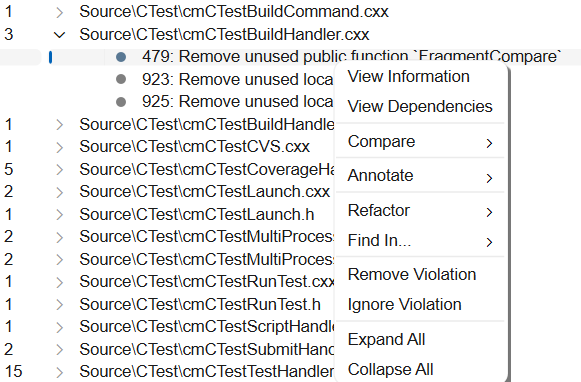
Its neighbour on the hover row, Remove Violation, is temporary — it drops the violation from the current result list and it returns on the next inspection. Ignore Violation is the one that sticks. (Rows for Understand's own parse errors and warnings — the dark-red and gold ones — offer only Remove Violation; those get fixed rather than waived.)
The same action is available in two other places:
- the violation popup in the editor — the Ignore Violation button;
- the Explore window for a path-sensitive violation — the Ignore button.
Record the rationale
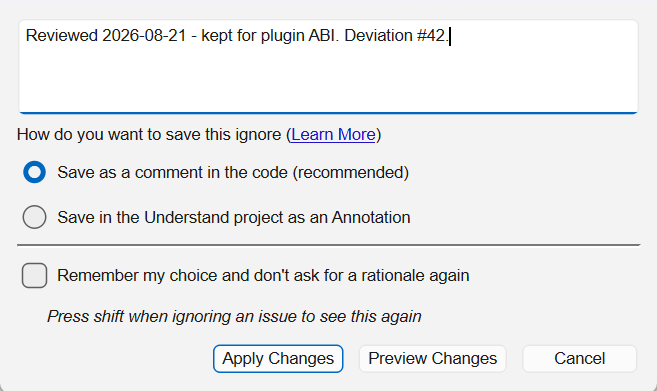
- The text box takes the rationale. Say who accepted the deviation, when, and against which approval record.
- Save as a comment in the code (recommended) writes an
UndCC_Linecomment into the source. It is the most dependable way to share an ignore with your team, because it travels with the file itself: every clone, every branch and every CI run honours it, with no project state to keep in sync. - Save in the Understand project as an Annotation records that same
UndCC_Line(...)text as an annotation against the file and line, leaving the source untouched. - Preview Changes shows the edit as a before/after diff before anything is written; Apply Changes writes it immediately. Preview is only offered for the comment option.
- Remember my choice and don't ask for a rationale again skips the dialog from then on — subsequent ignores are applied straight away, using the save method you chose last and no rationale. Hold Shift while ignoring to bring the dialog back.
When to save it as an annotation instead
Reach for the annotation when a comment isn't possible, or isn't welcome:
- You can't edit the code — vendor or generated sources, a read-only checkout, a frozen release branch, or a file another team owns.
- You don't want to clutter the code — a rule you waive in many places would otherwise thread suppression comments all through code you'd rather keep clean.
What you give up is reach. The ignore now lives in the project rather than in the source, so it
applies only for people working from the same Understand project — anyone analyzing that code in a
project of their own sees the violation again. Annotations are stored as ann_<author>.json files
inside the .und project directory, one file per author, and you share them by committing those
files along with the project: see how annotations are stored and
shared.
Annotations aren't something this dialog invents — they are Understand's general mechanism for attaching notes to code without touching it, and an ignore saved this way shows up like any other annotation: in the editor, the Annotation Viewer, the Annotations Browser, and the entity's Information Browser entry. Annotate & share notes without touching source covers the whole feature.
What gets written
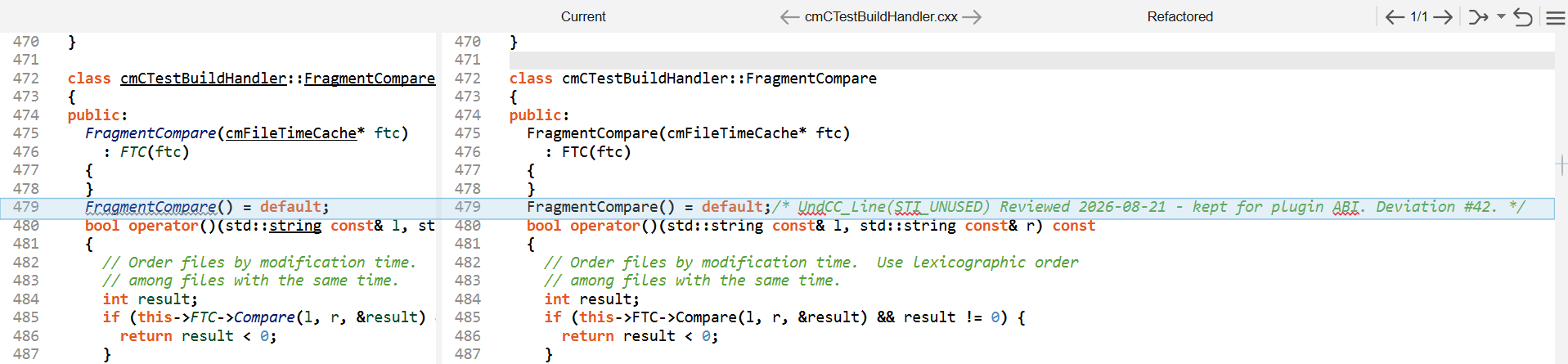
Understand appends the comment to the end of the violation's line and names the CheckID explicitly:
FragmentCompare() = default;/* UndCC_Line(STI_UNUSED) Reviewed 2026-08-21 - kept for plugin ABI. Deviation #42. */
Violations that share a line are combined into a single comment with a comma-separated CheckID list. Because the generated comment always names its CheckIDs, it satisfies Require Explicit CheckID on Ignores.
Wrote one you didn't mean to? Undo Last Refactor reverses it — see refactor safely.
Wider scopes
The GUI only ever writes UndCC_Line. To waive a whole range, file, or entity — or to write the
deviation into code you haven't inspected yet — add the keyword yourself:
suppress a violation / document a deviation in code.