Check out an offline license
Use this to run Understand on a machine with no internet access. You generate a request code in Understand, exchange it for a reply code at the licensing portal (licensing.scitools.com), and enter that reply code back in Understand. For the full picture of licensing on closed networks, see Licensing without internet (air-gapped).
Prerequisites
- An active license you're allowed to take offline (trials must be an offline trial).
- Access to licensing.scitools.com from some internet-connected device (phone, another PC), with the account that holds the license.
- Node-lock licenses use a different flow — see Set up a node-lock license at the end of this page.
1. Request an offline code (in Understand)
- Open Help → Licensing.
- Click Options → Request Offline Code.
- Copy the value shown in License Request Code.
If the machine has never been licensed you'll see the prompt “No license detected, please enter this code at scitools.com/offline”.
2. Get a reply code (at licensing.scitools.com)
On any device with internet, sign in at licensing.scitools.com:
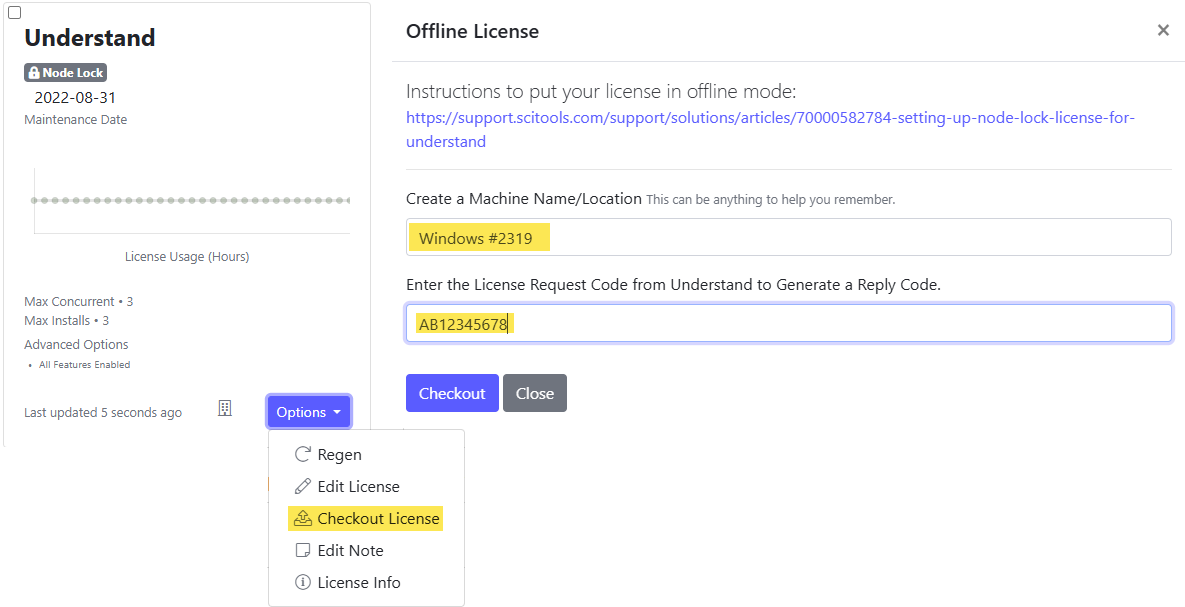
- Find the card for your license and click Options → Checkout License.
- In the Offline License dialog, enter a Machine Name/Location. This can be anything that helps you remember which machine holds the checkout. It appears later under Offline Machines when you extend or return the license.
- Paste the License Request Code from Understand and click Checkout.
- The portal shows the Reply Code (listed as the machine's Offline Code) and its expiration date. Copy both.
scitools.com/offline is for trials
Understand's dialog points to scitools.com/offline. That address opens a request form for an offline trial when you have no license yet. If you already have a license, use your license card at licensing.scitools.com as above.
3. Enter the reply code (in Understand)
Back in Help → Licensing → Options, enter the value into Reply Code (“Enter the Reply Code from scitools.com/offline”). Understand is now licensed offline.
Managing an offline license
From Help → Licensing → Options:
- Extend Offline Code — extend before it expires.
- Return Offline Code — return it so the seat can be used elsewhere. Full steps, including the connected method, the portal's Check-In License dialog, and node-lock licenses: Return an offline or node-lock license.
- Enter Online Mode — switch back when the machine has internet again.
Do it from the command line
For headless/CI machines, the same flow is available via und switches:
und -createofflinerequestcode            # prints the request code
# ...exchange at licensing.scitools.com (Options > Checkout License)...
und -setofflinereplycode <REPLY_CODE> -expiration <yyyyMMdd>
und -isundlicensed                       # verify — purely local once a valid offline code is installed
und -showofflinereturncode               # when returning the license — prints the return code
If the machine does have internet access right now, und -enterofflinemode skips the manual
exchange entirely — it checks an offline license out directly from the server (and
und -enteronlinemode returns it later).
See Licensing from the command line and the
und licensing reference for the full switch list.
Set up a node-lock license
A node-lock license binds to one machine for the life of the license, and Understand never contacts
a license server to use it. The code exchange itself is self-serve at licensing.scitools.com and
uses the same Checkout License and Check-In License options as an offline seat. Only the
und switches differ.
-
On the target machine, generate the request code:
und -createnodelockrequestcodeIt prints a code beginning with
NL. This starts a fresh request, so any node-lock code already installed stops working and the command says so. To reprint the existing request instead, runund -shownodelockrequestcode. -
Check the license out at licensing.scitools.com with Options → Checkout License, exactly as in step 2 above. Paste the
NLrequest code, then copy the reply code and expiration date it returns. -
Install the reply code:
und -setnodelockreplycode <CODE> -expiration <yyyyMMdd>A perpetual license also needs
-maintenance <yyyyMMdd>. Without the dates the command reports that the code was not valid and lists the arguments it wants. -
Confirm it took. Help → Licensing shows Using Nodelock Mode with the code in the Nodelock Code field, and
und licensereports the same without checking out a seat.
To renew a node-lock license, check out a new reply code the same way and enter it:
und -extendnodelockcode <CODE> -extendnodelockdate <yyyy-MM-dd>
To move the license to another machine, see Return an offline or node-lock license.