Enforce dependency rules ("X must not depend on Y")
Once your code is organized into architectures —
built and enabled, or a
custom architecture that reflects your intended
design — you can declare rules about what may depend on what — for example, "the API must not
depend on the UI" — and have Understand flag every reference that breaks them. Not sure which rules
are worth writing? The Dependency Matrix shows where the unwanted coupling
already is.
Select an architecture node at the top of the dialog.
Tick the rule(s) for that node and pick the other node they apply to. Available rules:
Rule
Meaning
No circular dependencies allowed among immediate children
The node's child nodes may not form cycles.
can't depend on anything except…
The node may only depend on an allowed list.
can't be depended on by anything except…
Only an allowed list may depend on the node.
can't depend onX
The node must not depend on node X.
can't directly depend onX
The node must not depend directly on node X.
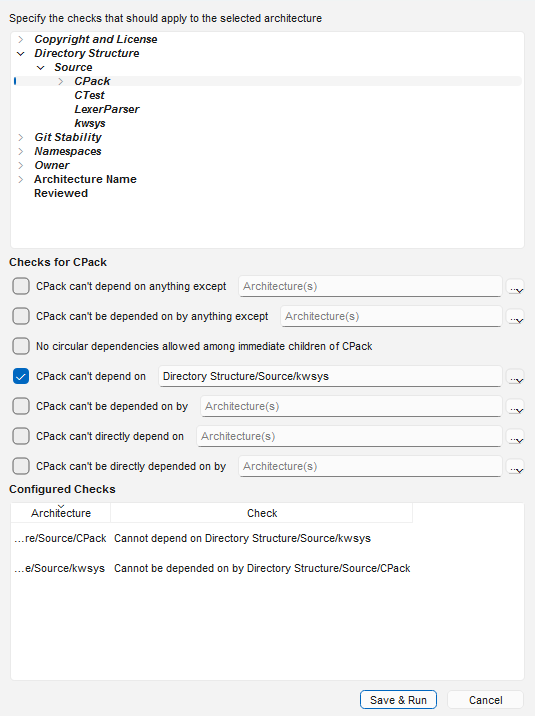
Each rule you add appears in the Configured Checks list. One rule can add two checks —
e.g. "src/cli can't depend on src/plugins" also verifies "src/plugins is not depended on by
src/cli", because references go both ways.
Click Save & Run.
One rule, two checks: ticking CPack can't depend onkwsys adds both directions to the Configured Checks list.
Re-run any time with Checks → Run Dependency Checks.
Dependency Violations panel — the list of violations (with any exceptions noted). Its toolbar
has Configure, Export csv, a Filter (limit to uncommitted
changes, an architecture, or
a custom filter), and toggles for the two views below.
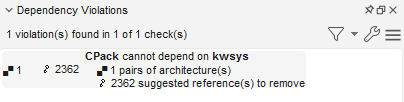
The Dependency Violations panel: each failed check reports how
many architecture pairs violate it and how many references would have to go.
- Dependency Violation Graph — shows the relationships that break the selected check. Expand
nodes to reach the offending references; highlighted lines are the references Understand suggests
removing to break the dependency.
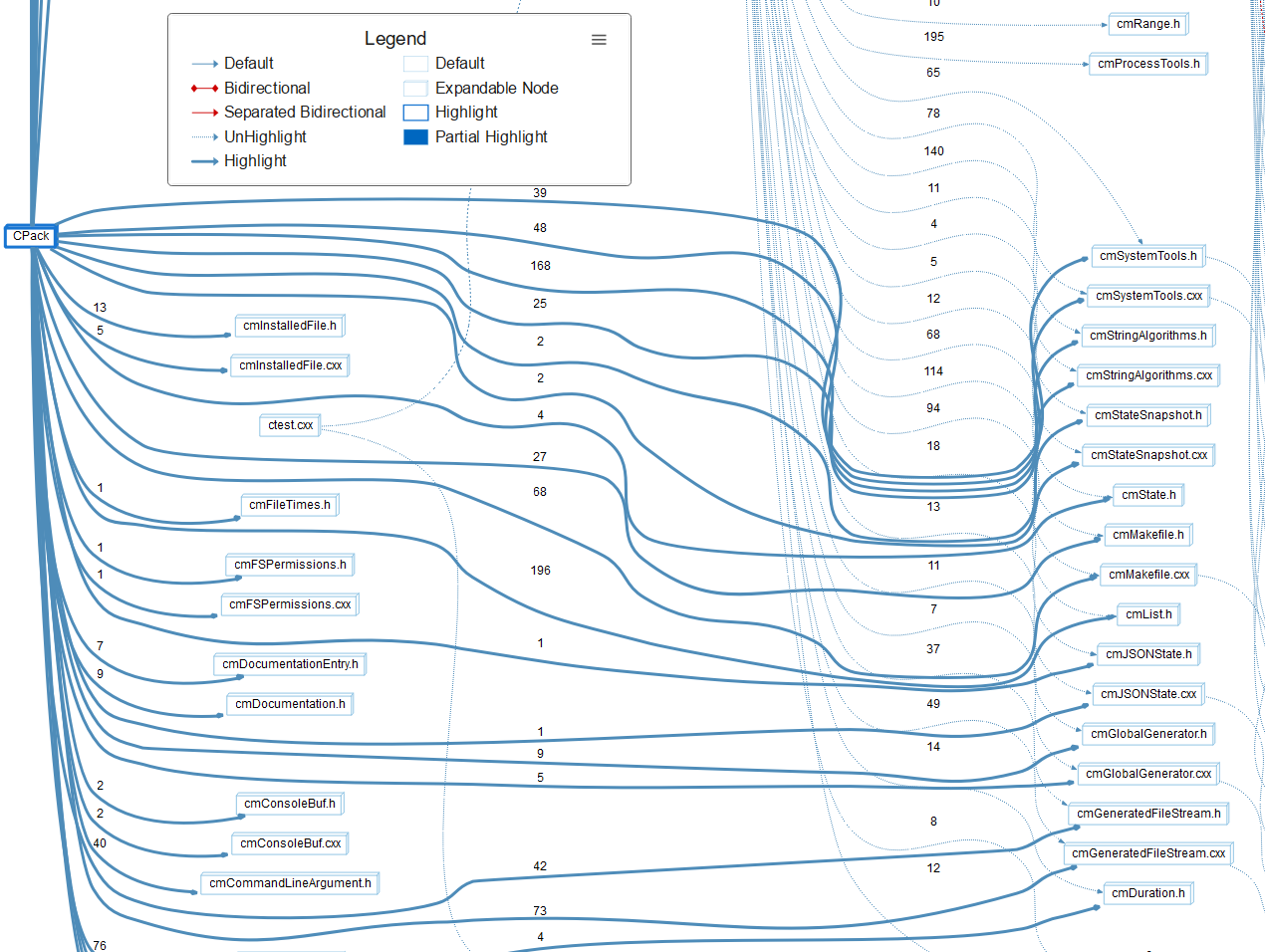
The violation graph for CPack cannot depend on kwsys: the thick
highlighted edges (with reference counts) are the dependencies Understand suggests
removing; everything else fades to dotted UnHighlight lines.
- Dependency Browser — lists the exact references behind the selected violation. See
browse & export dependencies.
Selecting a violation scopes the Dependency Browser to it — the
right pane drills down to the exact Includes references, file and line, behind the
broken rule.
Dependency checks are CodeCheck checks (their IDs start with
DEP_ in the check catalog), so you can enforce them continuously
rather than by hand:
In the background: add the dependency rule to a CodeCheck configuration and turn on Run in
Background — developers get a warning in the editor the moment they add a forbidden dependency.
See background checks.
In CI: include the rule in a configuration run by und codecheck.
und codecheck can also scope a run to an architecture with
-arch "Directory Structure/src".
Stop the bleeding first
If an existing codebase already violates a new rule, enforce it in the background to block new
violations while you work through the backlog, rather than trying to fix everything at once.