Suppress a violation / document a deviation in code
For safety/compliance work you often need to accept a specific violation and record why. CodeCheck lets you do that with an in-code comment — the suppression and its rationale live next to the code and travel with it (auditable deviations).
Ignore it from the GUI
During triage you don't have to type the keyword. In the Violation Browser, right-click a violation and choose Ignore Violation — or click the icon that appears on the row as you hover it (Permanently ignore this violation). Select several rows first to ignore them in one pass, or right-click a file row to ignore every violation under it. The same action sits on the editor's violation popup, and on the Ignore button in the Explore window for a path-sensitive violation.
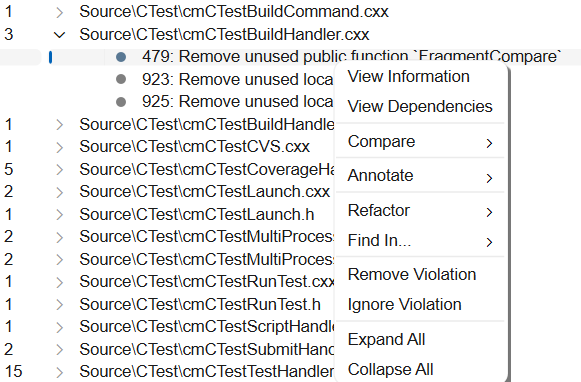
Its neighbour on the hover row, Remove Violation, is temporary — it drops the violation from the current result list and it returns on the next inspection. Ignore Violation is the one that sticks. (Rows for Understand's own parse errors and warnings — the dark-red and gold ones — offer only Remove Violation; those get fixed rather than waived.)
The Ignore Violation dialog is where the note is written:
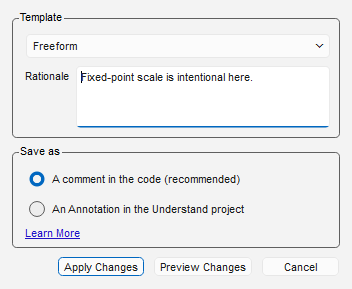
- Rationale is the sentence that becomes the note on the keyword line — say who accepted the deviation, when, and against which approval record. Where the project offers an ignore template the rationale is a row inside the Template box, and picking a template replaces that row with the record's own fields — see Record a structured deviation. Offer no template and the rationale simply has a box of its own.
- Save as chooses the storage: A comment in the code (recommended) or An Annotation in the Understand project.
- Apply Changes writes it. Preview Changes shows a before/after diff first, and is offered for the comment form once every required field has a value.
Understand appends the comment to the end of the violation's line and always names the CheckID, so what it writes already satisfies Require Explicit CheckID. Violations that share a line are combined into one comment with a comma-separated CheckID list.
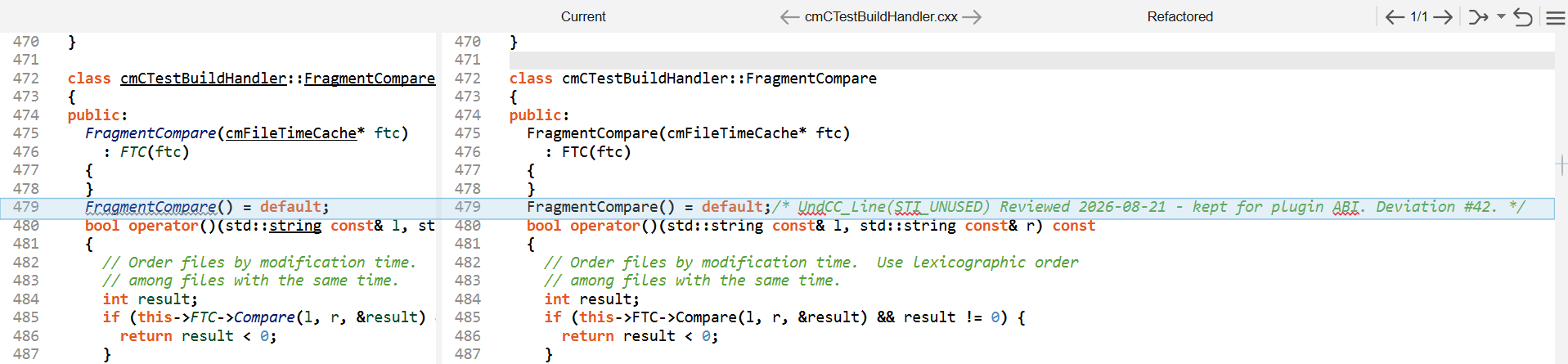
Wrote one you didn't mean to? Undo Last Refactor reverses it — see refactor safely.
When to store it as an annotation instead
A comment is the dependable way to share an ignore, because it travels with the file itself: every clone, every branch and every CI run honours it, with no project state to keep in sync. Reach for the annotation when a comment isn't possible, or isn't welcome:
- You can't edit the code — vendor or generated sources, a read-only checkout, a frozen release branch, or a file another team owns.
- You don't want to clutter the code — a rule you waive in many places would otherwise thread suppression comments all through code you'd rather keep clean.
What you give up is reach. The ignore now lives in the project rather than in the source, so it
applies only for people working from the same Understand project — anyone analyzing that code in a
project of their own sees the violation again. Annotations are stored as ann_<author>.json files
inside the .und project directory, one file per author, and you share them by committing those
files along with the project: see how annotations are stored and
shared. An ignore saved this way is
an ordinary annotation in every other respect — it shows up in the
editor, the Annotation Viewer, the Annotations Browser, and the entity's
Information Browser entry.
Lift an ignore
A comment-stored ignore is ordinary source: delete the UndCC_ comment and the violation is back on
the next check.
Lift an annotation-stored one by deleting the annotation — from its card, or from the Annotations Browser, where a CodeCheck annotation carries CodeCheck's own icon. Deleting, moving, or editing an ignore annotation marks the annotated file for re-check, so the violation reappears the next time the checks run.
The keywords
Put an UndCC_ comment on or around the code. The rationale is anything you write after the keyword:
goto cleanup; // UndCC_Line(*) goto approved by G. Turner on 2014-11-07 (deviation #42)
| Keyword | Scope |
|---|---|
UndCC_Line(...) |
this line |
UndCC_NextLine(...) |
the next line |
UndCC_Begin(...) … UndCC_End(...) |
a range of lines |
UndCC_File(...) |
the whole file |
UndCC_Entity(Name, ...) |
everywhere in the named entity |
UndCC_EntityBegin(Name, ...) … UndCC_EntityEnd(Name, ...) |
the named entity, within a range |
The keyword prefix is case-insensitive (undcc_).
Target all checks or specific ones
The argument in parentheses is a CheckID list, or * for all checks:
x = y;  // UndCC_Line(*)            ignore ALL violations on this line
x = y;  // UndCC_Line(MISRA23_10.1) ignore only MISRA 23 rule 10.1 here
You can pass a comma-separated list of CheckIDs. CheckIDs are shown in the Understand GUI next to each check.
Require an explicit CheckID (recommended for compliance)
Turn on Require Explicit CheckID on Ignores (project setting CodeCheckProjectSettings/RequireExplicitCheckID)
so a bare UndCC_Line(*) is rejected — every suppression must name the rule(s) it waives. When it's
missing, CodeCheck reports *** Required CheckID Missing.
Record a structured deviation
A rationale sentence is enough to suppress, but compliance work usually needs more: which
guideline, why it's justified, who approved it and when. Write those as Label: value lines
inside the same comment, under the keyword line:
int i = 0.1; /* UndCC_Line(MISRA23_10.1) Reviewed with the safety team
                Template: MISRA Deviation
                Guideline: Rule 10.1
                Justification: Fixed-point math is intentional here
                Approved By: G. Turner
                Approval Date: 2026-08-07 */
The first line after the keyword stays the rationale; each following Label: value line is a
field of the deviation's record (a record with no rationale simply opens with its
Template: line). The whole note — rationale and record lines together — travels with the
suppression: reports parse it, and Viol.ignores() hands it to scripts.
You don't have to type the block by hand. Mark an annotation
template with "Offer this template when ignoring a
CodeCheck violation" and the Ignore Violation dialog presents its fields as a form; applying
writes exactly this comment (the Template: line names the template, which is how the analysis
knows which fields were required). Choosing An Annotation in the Understand project instead
stores the same
values in the Understand project rather than in your source — both storage forms carry the same
record and every report reads them alike. Deleting that annotation lifts the suppression, and the
violation comes back the next time the checks run: analysis is what updates background violations,
so Understand marks the annotated file as needing a re-check when you add or remove an annotation
ignore. The full workflow — enforcement and reporting included — is Turn suppressions into
deviation records.
Reports over the deviations
Suppressed violations aren't deleted — they are marked as ignored and hidden by default, so an auditor can still review every deviation. The records feed a family of audit reports:
- Deviation Register — every suppression with its rationale and record, the gaps called out.
- Guideline Compliance Summary — the MISRA Compliance:2020 table, one verdict per guideline.
- Deviation Approval Records — DO-178C-shaped QA evidence, approval first.
- Deviation Risk Assessment — deviations missing a risk assessment listed first.
- Accepted Risk Register — the security dispositions (Severity / Status / CWE), worst first.
They complement the compliance report. An ignore that names a template
but leaves required fields unanswered is an analysis error, so
und codecheck -exitstatus errors fails a CI run over it — see
Turn suppressions into deviation records.