Standardize team notes with annotation templates
Annotations attach notes to entities, files, and lines without touching the source. A template gives those notes a shape: named fields with types, defaults, and required-ness, so a code review, an action item, or a technical-debt marker records the same things whoever writes it — and can be grouped and searched afterwards.
Create a template
Annotations → Annotation Templates… opens the template editor:
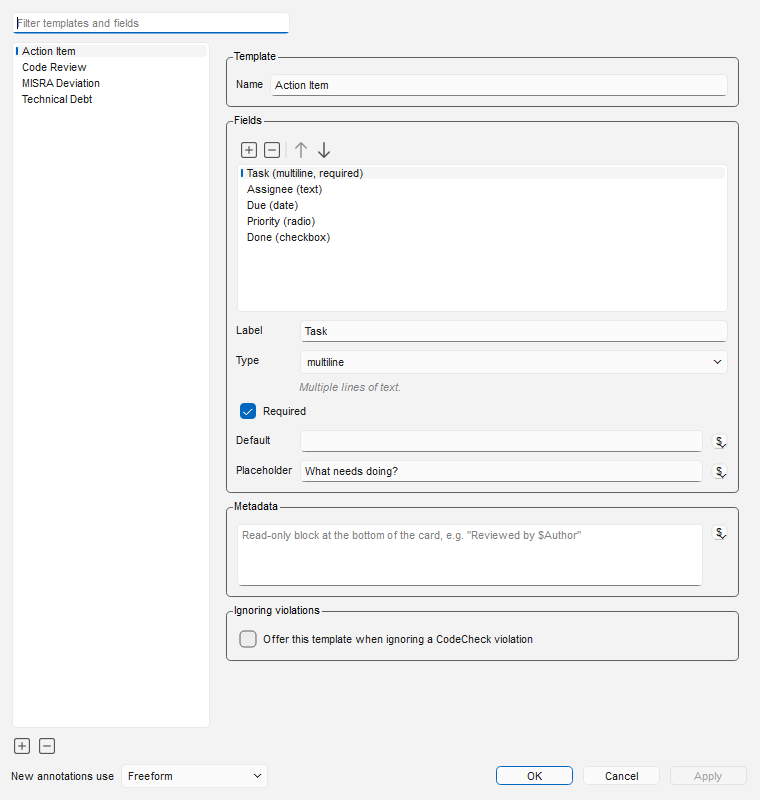
Add a template with + (− removes the selected one), name it, then add fields. Each field has a label and a type:
| Type | Records | Notes |
|---|---|---|
| text | one line | |
| multiline | free text | |
| droplist | one (or several) of a closed set | enable multi-select per field |
| radio | one of a closed set | shown as radio buttons |
| checkbox | yes/no | |
| date | an ISO date | calendar picker |
| number | a number | |
| url | a link | clickable on the card |
| label | descriptive text only | headings/instructions; records nothing |
A droplist or radio field can also depend on another field: set Depends on and its options follow that field's value — e.g. Component offers different parts per Area. Options are entered one depends-on value at a time (Options when), with a live preview, and plain lines are base options offered whatever the value is.
Three per-field switches do most of the work:
- Required — the annotation card and the Ignore Violation dialog both insist on a value before the record is saved, and reports flag records that lack one.
- Default — pre-filled at creation. Defaults (and placeholders, and the Metadata block)
expand
$parametersagainst the annotated entity:$Author,$Date,$EntityName,$FileShortName,$Line,$ArchNameand more — so "who recorded this, where, when" fills itself. - Placeholder — the hint shown while the field is empty.
The Metadata box adds a read-only block to the bottom of every card made from the template
(e.g. Reviewed per the team's QMS procedure) — prefix a parameter with !! to drop its whole
line when the value is blank, so Architecture: !!$ArchName writes nothing when annotating code.
On a deviation record it rides after the fields. The Ignoring violations switch offers the
template in CodeCheck's Ignore Violation dialog — that path has
its own page.
Templates are stored in the project's annotation_templates.json, so the whole team shares the
same set through version control or the shared project directory.
Use it on an annotation
Annotate as usual (right-click → Annotate) and pick the template in the card's droplist. The card becomes a form; required fields are starred — the label turns red while the field is still empty — and hold the card open until answered:
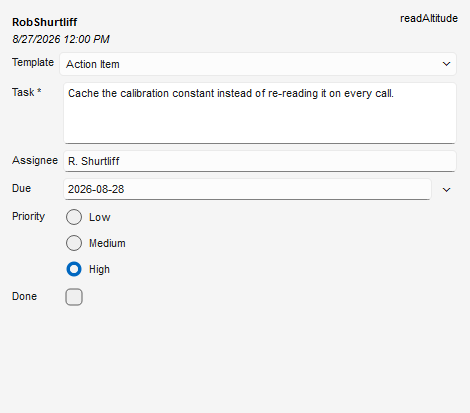
Click away and the same card reads as text:
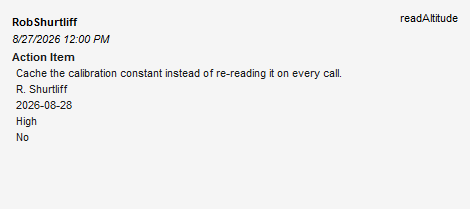
New annotations use (bottom of the template editor) sets what a fresh annotation starts as: a specific template, Freeform, or Last Used — whatever that author picked last in this project. Retyping an annotation to a different template carries values whose field keys match; the card reports what a retype would drop before it happens. Retyping a Freeform note onto a template discards the free text — the template's own stamp and fields take its place — and the card warns before doing so. Retyping between two templates keeps any text that was written under the prior template's block, and retyping back to Freeform keeps it too.
Find the records again
The Annotation Browser (Annotations → Browse All Annotations) groups the project's annotations by author, date, location — and by template and field values, which is where structured notes pay off:
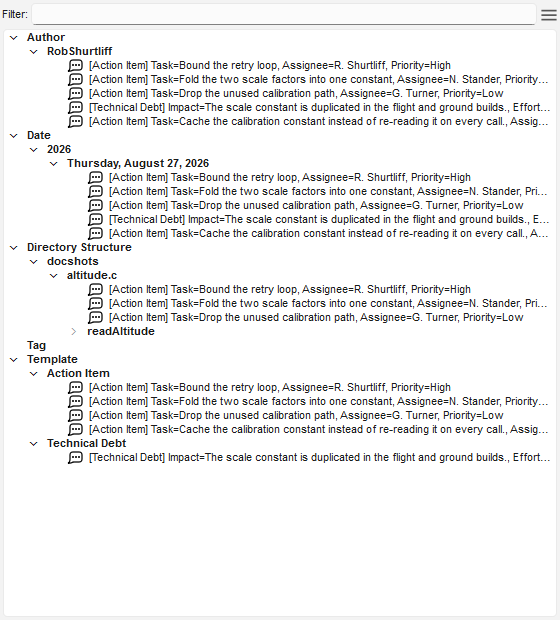
The browser answers the question interactively, but "is every file classified, and what is
still missing?" also needs an answer you can hand to someone — a review meeting, a milestone
check. The Annotations by Template Interactive Report is that document: one page per
template with every field as a column, required gaps counted up front, and each missing value
flagged as a red (missing) cell:
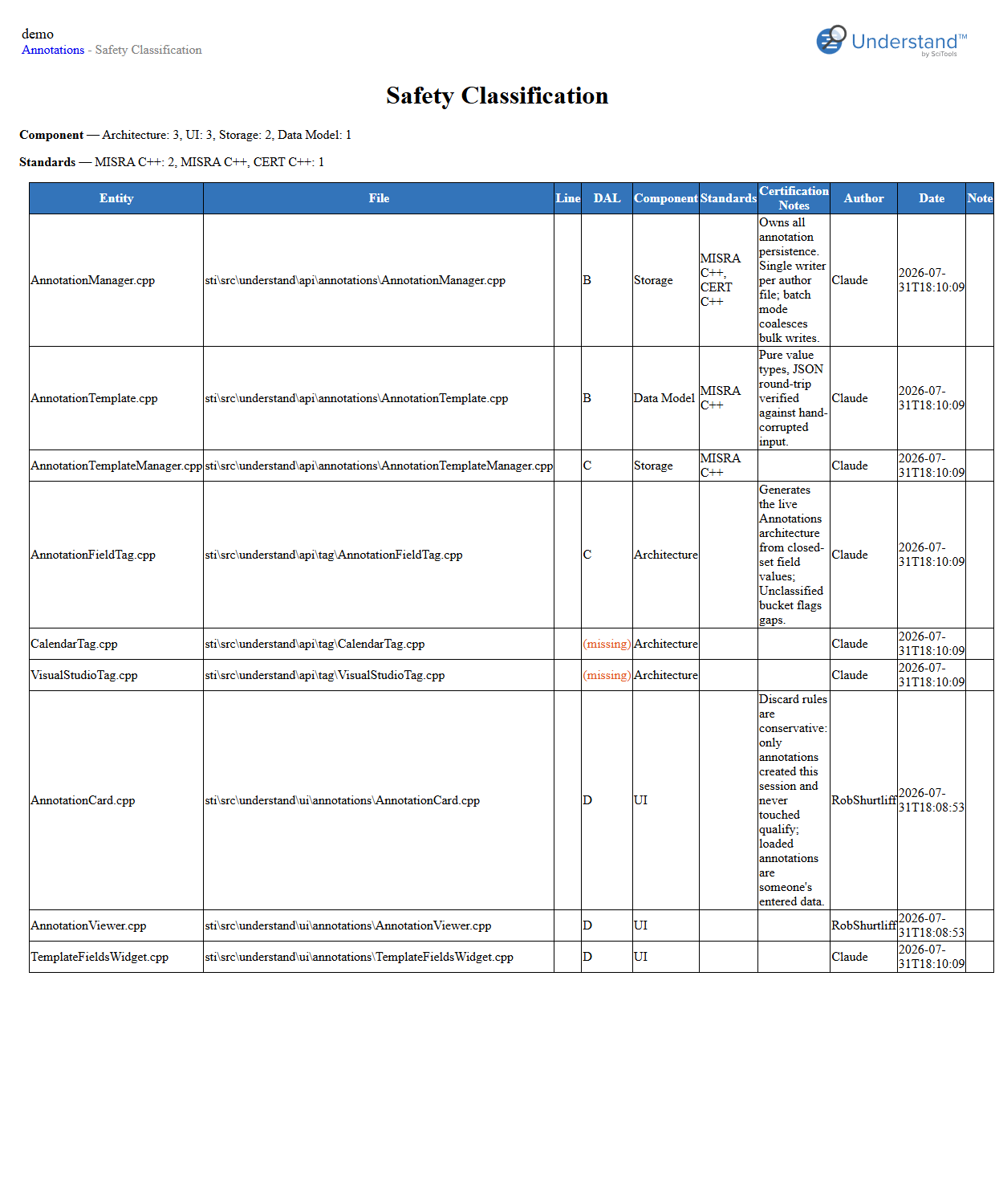
Run it from the project's Interactive Reports, or headlessly:
und -db project.und report -format html "Annotations by Template" out
Classify in bulk from the command line
A template adopted mid-project starts with a backfill problem: the groupings and reports above
only pay off once every file carries its record, and nobody is opening two thousand cards by
hand to get there. und annotate is the backfill: it applies a template to every entity a
search matches, with $parameters expanded per target, so one command classifies a whole tree:
und -db project.und annotate -template ownership -fields "Component=$FileShortName;Owner=$Author" -ents "file ~unknown ~unresolved"
Every project file gets an ownership annotation: -ents chooses the targets by kind string,
$FileShortName fills Component with each file's own name, and $Author fills Owner with the
user running the command. Fields the assignments leave unset fill from the template's defaults;
-retype moves existing annotations between templates with the same carry-over rules as the
card. The same command re-run after an analysis keeps coverage complete as files are added.
See the und annotate reference.
Scripts read the records as text
atn.text() returns the annotation as displayed — the body, then the record inlined as one
Label: value line per field, opening with Template: <name>. Parse the fields back with the
shared reader the deviation reports use (plugins/Shared/und_lib/deviations.py,
fields_from_note), so every consumer reads a record the same way.