Turn suppressions into deviation records
Suppressing a violation is easy; defending the suppression at an audit is the real work. A MISRA/AUTOSAR program needs each accepted violation to name its guideline, justify itself, and carry an approval. This page wires that up so the record is captured at the moment of suppression, enforced by the analysis, and reported without any copy-paste.
It builds on Suppress a violation (the UndCC_ keywords) and
annotation templates (the field sets).
1. Offer a template when ignoring
In Annotations → Annotation Templates…, give a template the fields your process requires — Guideline, Justification, Approved By, whatever your standard demands, with the must-haves marked Required — and turn on "Offer this template when ignoring a CodeCheck violation".
2. Ignore a violation with the record attached
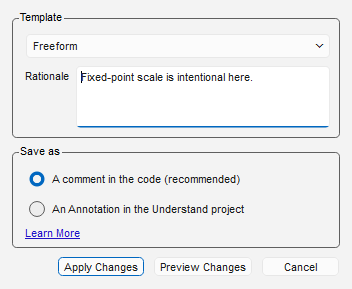
Right-click a violation → Ignore Violations. Freeform is still the default — a one-line rationale and done:
Pick the template instead and the dialog becomes the record's form. Required fields must be answered before Apply Changes or Preview Changes unlock; the free-text rationale box folds away, because the record is the note:
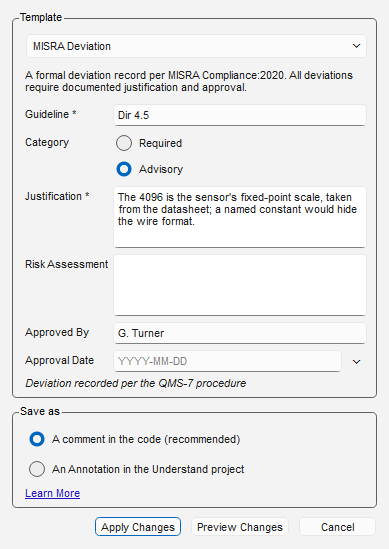
Both storage choices carry the same record:
-
A comment in the code (recommended) writes the keyword plus one
Label: valueline per field, opening with the template's name:int scale = 4096; /* UndCC_Line(RECOMMENDED_08) Template: MISRA Deviation Guideline: Dir 4.5 Justification: The 4096 is the sensor's fixed-point scale Approved By: G. Turner Approval Date: 2026-08-07 */ -
An Annotation in the Understand project stores the same values in Understand instead of your source. CodeCheck reads both identically — the note, record lines and all, is the single source of truth, so hand-written comment blocks in exactly this shape work too.
A template's Metadata block (if it has one) is expanded and carried with the record. It is shown in the dialog before you apply, and it is part of the note in either storage form.
3. Enforce complete records in CI
An ignore that names a template but leaves required fields unanswered is a CodeCheck analysis
error, reported on every analyze through the same channel as an invalid CheckID — in the GUI's
Inspection Errors, in und output, and in the SARIF log:
Incomplete ignore record: template "MISRA Deviation" requires Justification
In CI, make it fail the pipeline:
und -db project.und codecheck -exitstatus errors MISRA.json out/
-exitstatus errors returns the analysis error count, so one undocumented deviation is a
non-zero exit the day it is written. Freeform ignores are never judged — adopting templates is
opt-in per suppression, so a team can migrate gradually.
4. Report for the audit
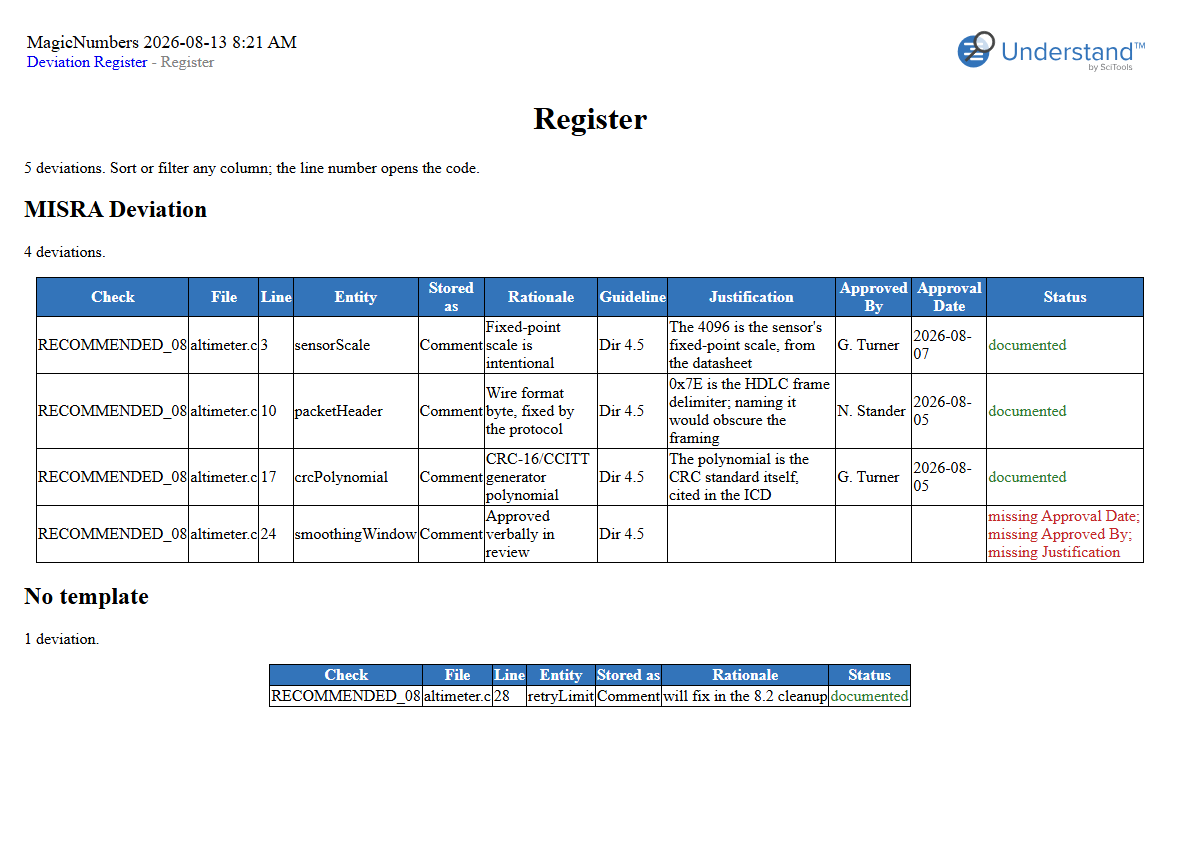
The Deviation Register interactive report reads every suppression in an inspection — comment or annotation, templated or freeform — and builds the audit table. Open it from the inspection's CodeCheck overview page under Other Inspection Reports, or generate it headless:
und -db project.und codecheck MISRA.json out/ report -codecheck -format html "Deviation Register" report/
Its Summary page gives the completeness picture at a glance; a separate Gaps page lists the incomplete records, worst first:
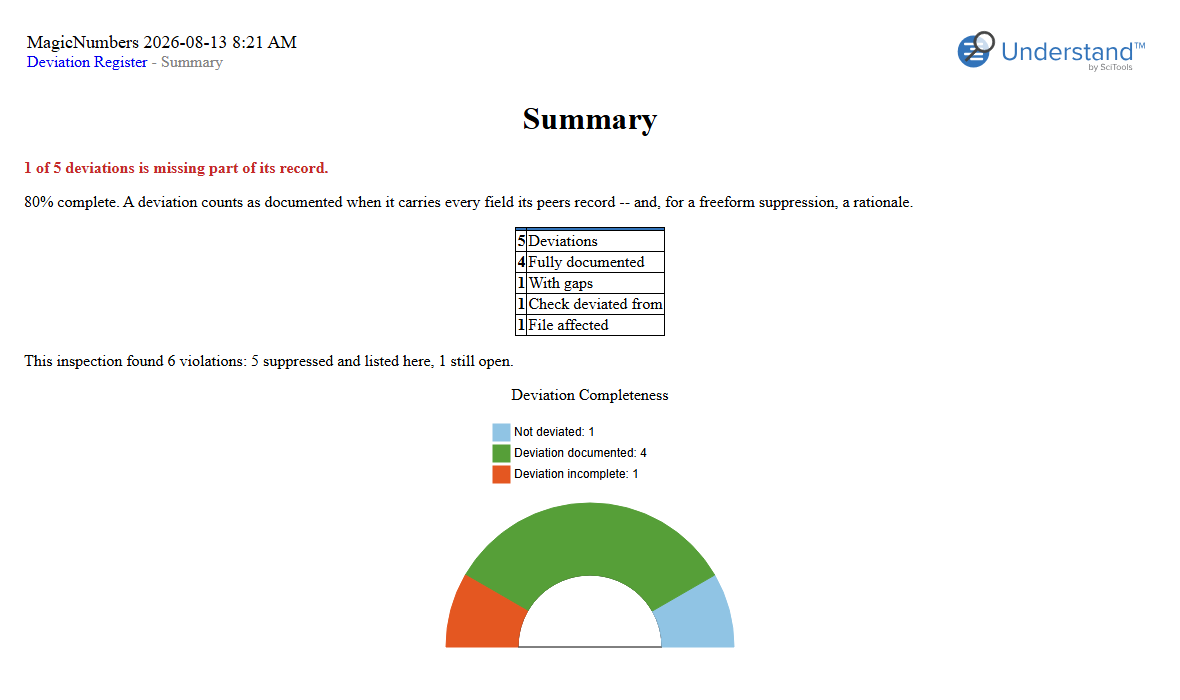
Completeness is judged two ways, on purpose: the analysis error enforces the template's own required fields (a hard rule, CI-enforceable), while the register also measures each record against what its peers record — a field most deviations carry is expected of all of them, so a quietly-dropped Approval Date still surfaces even if it was never marked required.
The same records feed four standards reports, each answering one question an audit actually asks. All four run exactly like the register — Other Inspection Reports in the GUI, or the same headless command with the report's name.
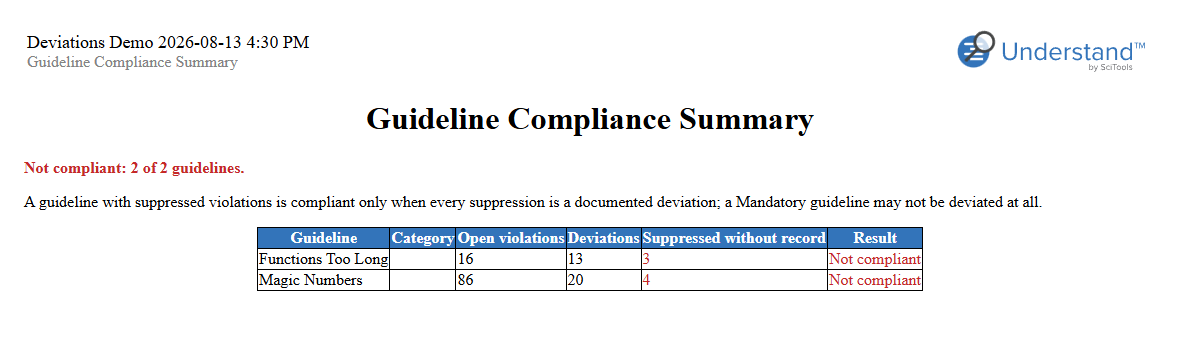
Guideline Compliance Summary
MISRA Compliance:2020 closes on one table: for every checked guideline, is the project compliant, compliant with deviations, or not? Deriving that by hand means walking each guideline's violations and checking every suppression for a record. The report renders the verdict directly — a suppression counts as a deviation only when it is documented, so the "Suppressed without record" column is the distance to compliance:
Deviation Approval Records
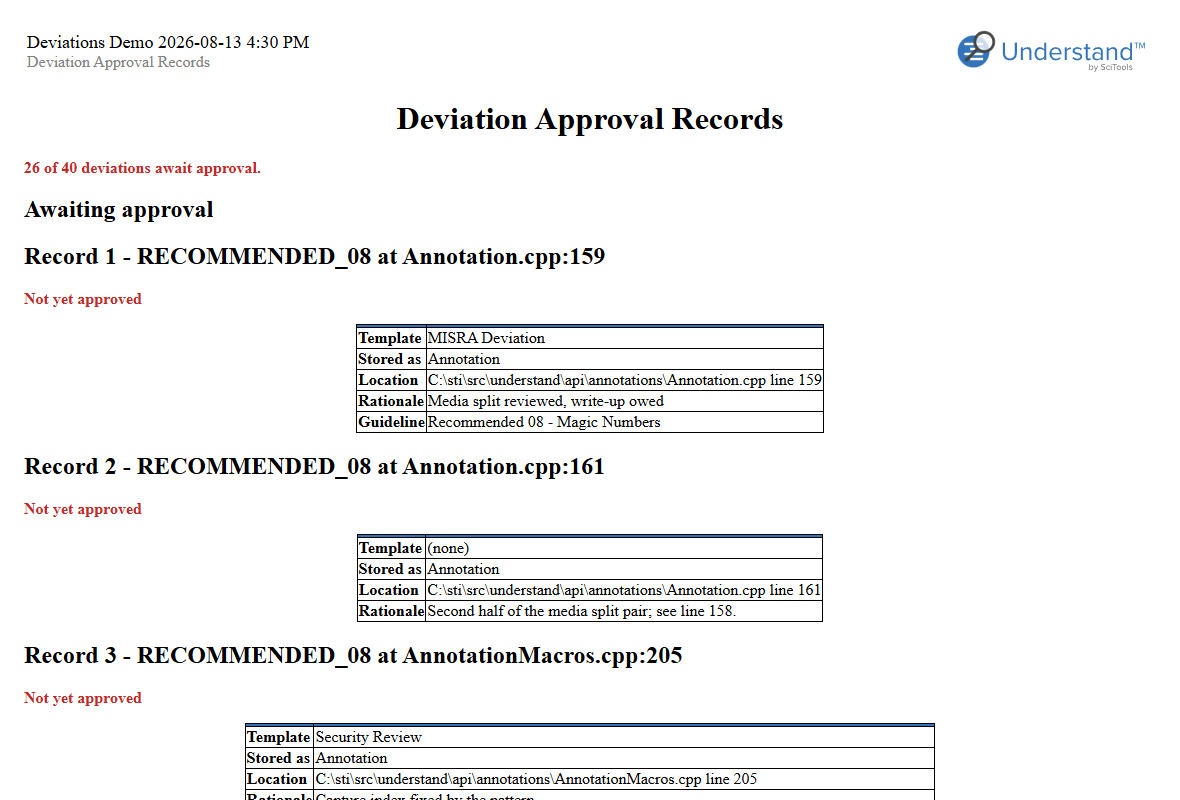
A quality-assurance review (DO-178C and its kin) wants sign-off evidence: who approved each deviation, and which ones nobody has approved yet. Grepping approvals out of comments doesn't scale. The report prints one record block per deviation, approval first — and puts the unapproved ones at the top, because they are the open work:
Deviation Risk Assessment
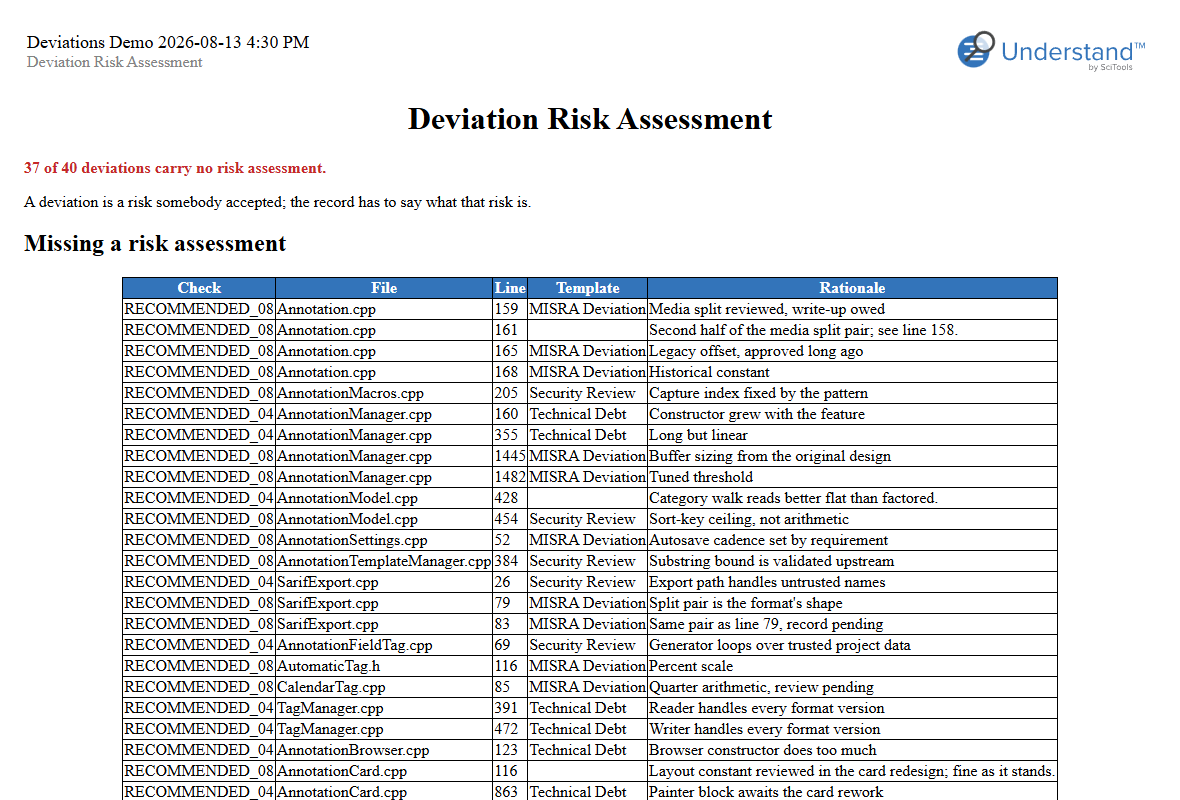
ISO 26262 / IEC 61508 treat a deviation as a risk somebody accepted — so the record has to say what that risk is. The report lists the deviations that carry no risk assessment first, as the finding, with the assessed ones following for review:
Accepted Risk Register
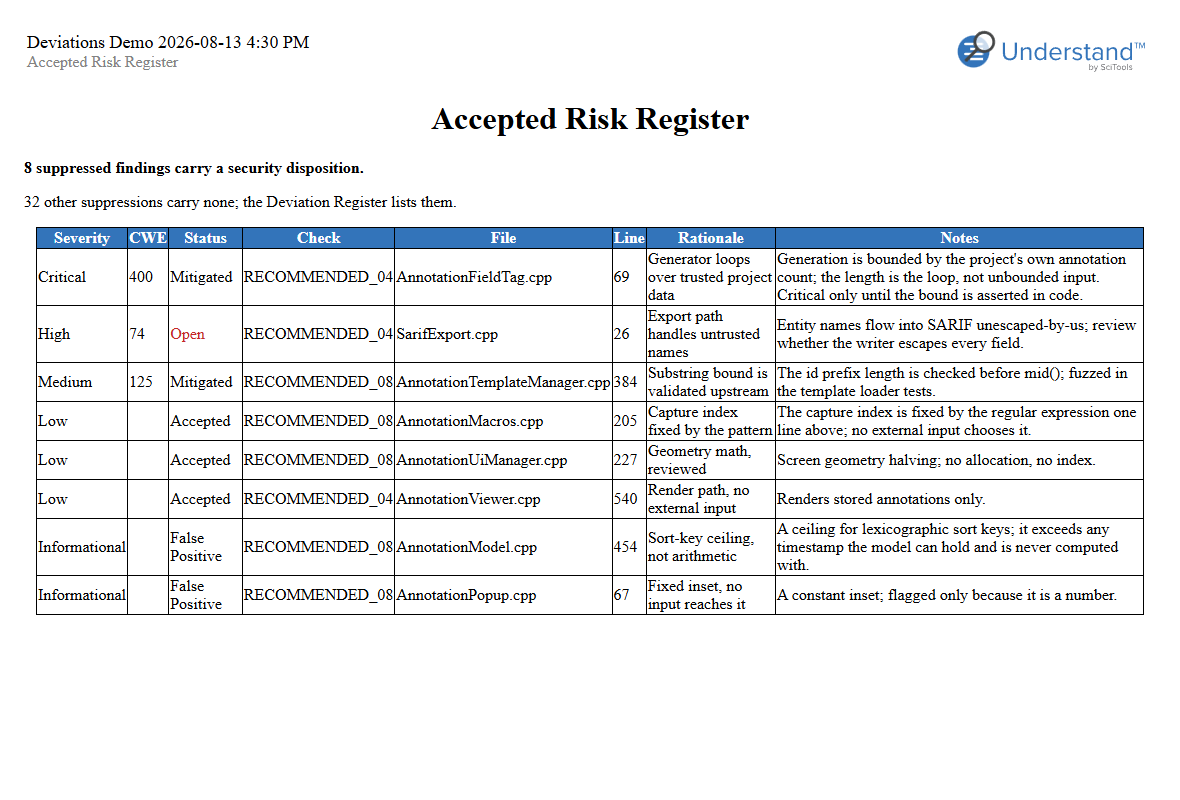
A security audit tracks accepted findings by severity and disposition — and the ones nobody dispositioned must not quietly disappear. The report is that log: suppressions carrying Severity / Status / CWE, worst first, with the undispositioned remainder counted up front:
For coverage of all structured annotations — suppressions or not — see Annotations by Template; the compliance report rounds out the audit set.
Scripts and exports
A violation's suppressions arrive through Viol.ignores() as (source, note) pairs, the note
carrying the record inline; atn.text() returns an annotation the same way. Parse fields out
with the shared reader the reports use (plugins/Shared/und_lib/deviations.py,
fields_from_note). The SARIF log carries each suppression's whole note as its justification.