Read the Information Browser
The Information Browser (IB) shows just about everything Understand knows about an entity — and it adapts to the entity type. For a function you'll see what it calls and is called by, its parameters, basic metrics, and everywhere it's used, set, or modified. It's the first stop of the 10-minute tour for good reason.
Open it
Right-click any entity (in source, a list, or another view) → View Information (Ctrl+I). By
default the IB is docked at the bottom-left. It's also on the View → Information Browser menu.
Walk the relationships
Relationship branches (calls, references, members, …) are a tree — expand a branch to follow it several levels deep without leaving the IB. The small graph and metric icons on an entry are shortcuts to the related graphs and metrics.
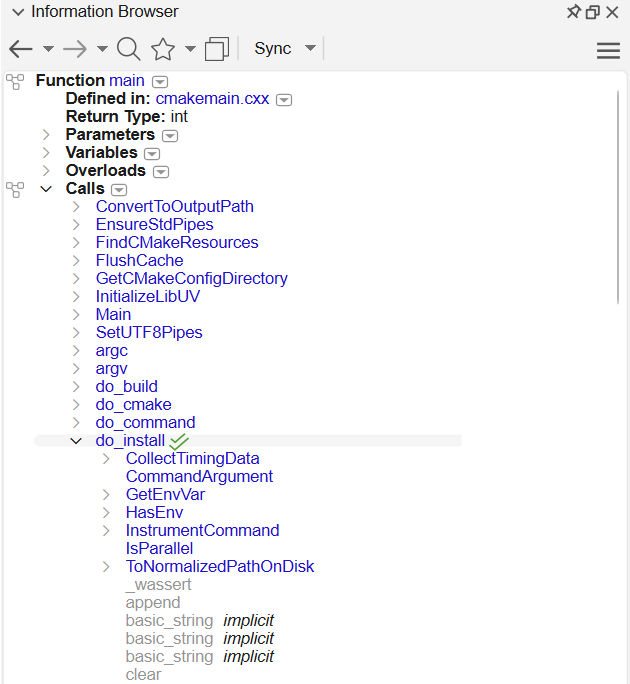
main: the Calls branch expanded, then
do_install expanded beneath it — each level is one more hop through the call
tree.Keep it in sync
With Browse Mode on, clicking entities in the editor updates the IB automatically, so it always reflects what you're looking at. For a version that follows your editor cursor instead of a selection, see Contextual information and scope; to step through the function's logic itself, hand it to the Virtual Debugger.
The same data is scriptable
Everything the IB shows comes from the entities and references in the database — the same objects
the Python API exposes as understand.Ent and
understand.Ref.